
Are you wondering if you really need a manifest.json file for your website or app? You might have heard about it but aren’t sure what it does or why it matters.
This small file can make a big difference in how your site looks and works, especially on mobile devices. If you want your visitors to have a smooth and engaging experience, understanding manifest. json is key. Keep reading, and you’ll discover exactly why this simple file could be the game-changer you’ve been missing.
The Role Of Manifest Json In Web Apps
The Manifest JSON file plays a crucial role in shaping how web apps behave and appear on different devices. It acts as a bridge between your web app and the operating system, providing essential information that enhances user experience. Understanding its role can help you decide whether you need to add it to your project and how it benefits your users.
What Is Manifest Json?
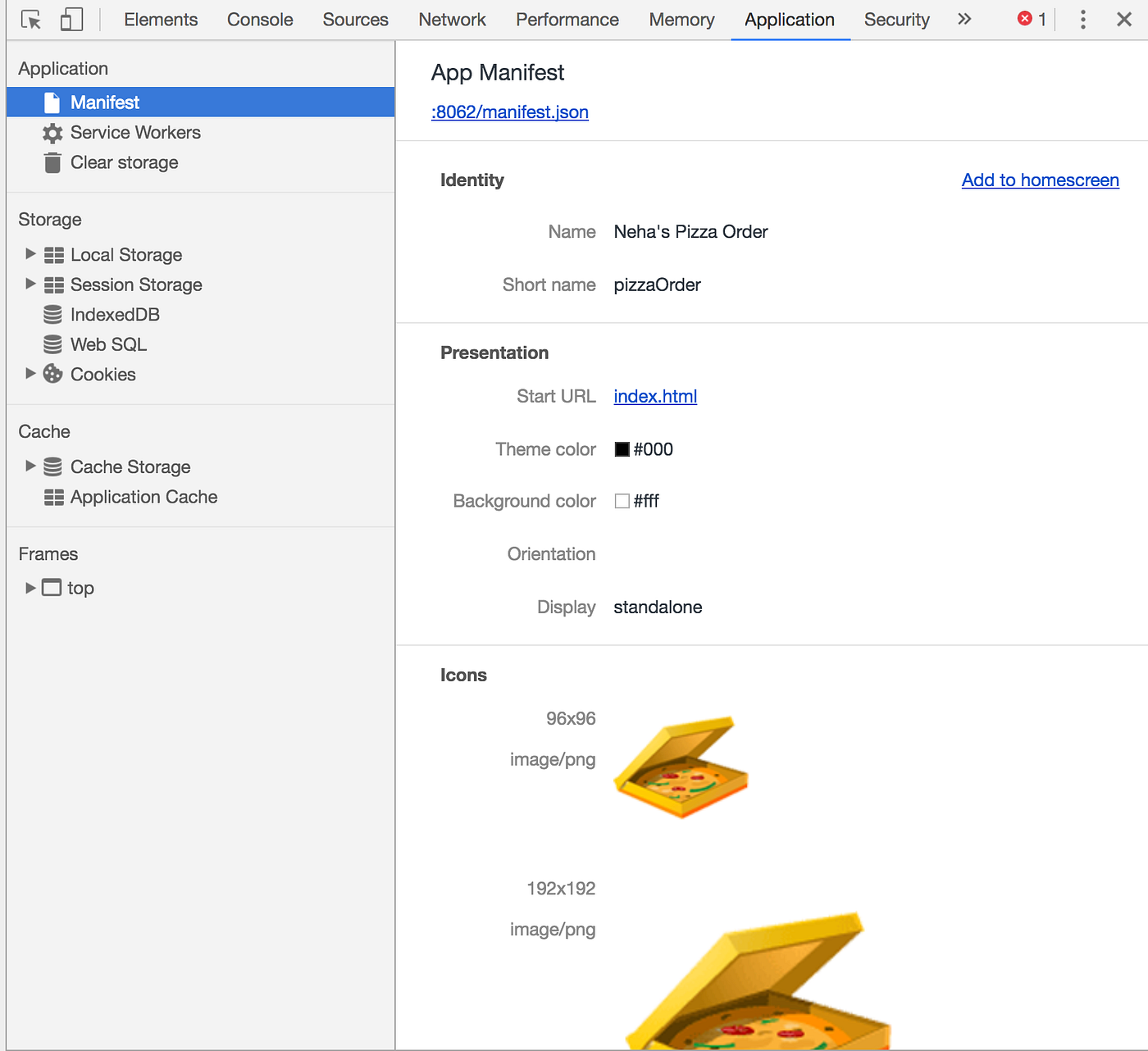
Manifest JSON is a simple text file in JSON format that describes your web app’s metadata. It includes details like the app’s name, icons, theme colors, and how it should launch on devices. Think of it as a profile that tells browsers and devices how to treat your app.
This file helps your web app look and feel like a native app when saved to a home screen or launched independently. Without it, your app might just open in a regular browser tab, missing out on the full app-like experience.
Common Use Cases For Manifest Json
Manifest JSON is essential for Progressive Web Apps (PWAs), where delivering a seamless user experience is key. It allows your app to:
- Appear with a custom icon and name on the home screen.
- Launch in a standalone window without browser UI elements.
- Set the screen orientation and background color during launch.
Beyond PWAs, Manifest JSON can improve how your app integrates with different platforms. For example, it helps Android devices recognize your web app as installable, encouraging users to add it to their home screens.
Have you ever wondered why some web apps feel just like native apps while others don’t? The presence of a well-configured Manifest JSON is often the difference.
Credit: github.com
Unlocking Web App Potential With Manifest Json
The manifest.jsonfile acts as a blueprint for your web app, defining how it appears and behaves when installed on a user’s device. It helps your app move beyond the browser tab, giving it a presence on the home screen, taskbar, or app launcher. This small file can significantly improve user experience and engagement by making your app feel more like a native application.
Benefits Of Using Manifest Json
Adding a manifest.jsonfile to your web app offers several practical advantages. It allows you to customize the app’s name, icons, theme colors, and start URL, ensuring your brand looks consistent across devices.
Users can launch your app directly from their home screen without opening a browser, which boosts accessibility. This direct access often leads to increased usage and better retention.
Additionally, the file supports offline capabilities when combined with service workers, letting your app function even without an internet connection.
Enhancing Web App Security With Manifest Json
Security might not be the first thing you think about with manifest.json, but it plays a subtle role in protecting your app’s integrity. The manifest must be served over HTTPS, which ensures your app isn’t tampered with during transmission.
It also helps enforce trusted app origins by specifying where the app can start and run. This limits the chance of malicious sites mimicking your app’s appearance or behavior.
Ensuring your manifest is accurate and up-to-date can prevent security issues related to outdated app metadata, which sometimes leads to vulnerabilities.
Manifest Json Best Practices
Creating a well-structured manifest.json file can make a big difference in how your web app performs and how users experience it. Paying attention to best practices helps ensure your app loads quickly, looks professional, and behaves as expected across devices. Let’s dive into some practical tips that you can apply right away to improve your manifest.json.
Optimizing Manifest Json For Performance
Keep your manifest.json file as lean as possible. Avoid adding unnecessary properties or oversized icons that can slow down your app loading time.
Use properly sized icons for different device resolutions instead of loading large images that get scaled down. This reduces bandwidth and speeds up the initial load.
Make sure your manifest.json file is served with appropriate caching headers. This helps browsers store it efficiently and only update it when needed.
Consider using a CDN to deliver your manifest.json for faster global access. This small step can improve loading speeds for users far from your main server.
Tips For Writing Effective Manifest Json
Be clear and specific in your app’s name and short_name fields. These appear on users’ home screens and should be easy to recognize.
Set the start_url carefully to point to the right landing page. If you want users to return to a certain state, customize this accordingly.
Use the display property wisely. Choosing between “standalone,” “fullscreen,” or “minimal-ui” changes how your app feels—think about what fits your user’s needs best.
Don’t forget to add a theme_color and background_color that match your branding. This small detail enhances the visual experience during loading and in the browser UI.
Test your manifest.json on multiple devices and browsers. Sometimes things look perfect on desktop but behave differently on mobile.
Have you checked how your manifest.json impacts your app’s user experience lately? Small improvements here can lead to higher engagement and happier users.

Credit: hellonehha.medium.com
When To Use Manifest Json
Knowing when to use a manifest.json file can save you time and improve your web project’s performance. This file acts as a guide for browsers and devices, telling them how to handle your app or website. But not every project needs one, so it’s important to understand the right situations to include it.
Determining The Need For Manifest Json
You should consider adding a manifest.json if you want your website to behave like a native app on mobile devices. It lets users add your site to their home screen with a custom icon and launch experience.
Think about your audience: Are they likely to visit your site repeatedly from mobile devices? If yes, a manifest.json enhances usability by providing a splash screen, controlling the display mode, and defining app colors.
Also, if you are building a Progressive Web App (PWA), the manifest.json is essential. Without it, your app won’t pass PWA criteria and won’t get the install prompt from browsers.
Alternatives To Manifest Json
Not every project needs a manifest.json. If your site is simple and only used on desktops, you might skip it entirely.
Other options include using meta tags to control some appearance aspects, like theme color or viewport settings. These don’t offer the full range of features a manifest.json provides but cover basic needs.
For native mobile apps, you rely on platform-specific configuration files instead of a manifest.json. So if you’re developing a native iOS or Android app, the manifest.json doesn’t apply.
Manifest Json In Modern Web Development
The manifest.json file plays a key role in modern web development. It helps define how a web app should behave when installed on a user’s device. This file contains important details like app name, icons, colors, and display mode. It improves user experience by making web apps feel more like native apps. Browsers read manifest.json to provide features such as home screen icons and full-screen display.
Using manifest.json is now a standard practice for progressive web apps (PWAs). It supports offline use, faster loading, and push notifications. Developers rely on it to create seamless and engaging web experiences. Understanding how to implement and use manifest.json is essential for modern web projects.
Integrating Manifest Json With Other Web App Technologies
Manifest.json works well with service workers to enable offline access. It pairs with responsive design to adjust the app layout on different devices. Web app frameworks like React, Angular, and Vue support manifest.json integration. This allows easy updates and better user engagement.
Other technologies that benefit from manifest.json include:
- Push notifications for real-time updates
- App caching for faster performance
- Background sync for smoother user experience
Combining these tools creates powerful, reliable web applications that users enjoy.
Future Of Manifest Json In Web App Development
Manifest.json will become more important as web apps grow more complex. New features may include better control over app appearance and behavior. Developers might see more options for customizing app installation prompts. Browsers could enhance support for advanced manifest properties.
Expect manifest.json to play a bigger role in cross-platform apps. It will help bridge the gap between web and native experiences. Keeping up with manifest.json updates is key for developers aiming to build modern web apps.
Credit: hellonehha.medium.com
Frequently Asked Questions
What Is A Manifest.json File?
A manifest. json is a JSON file that defines a web app’s metadata. It controls the app’s appearance, icons, and behavior on devices. This file helps browsers understand how to display your app when installed or bookmarked.
Why Do I Need A Manifest.json For My Website?
A manifest. json improves user experience by enabling app-like features. It allows users to install your website on their home screen with custom icons. It also controls how your site launches and displays on mobile devices.
Does Manifest.json Affect Website Seo Rankings?
Manifest. json does not directly impact SEO rankings. However, it enhances user engagement and mobile usability. Better user experience can indirectly improve your SEO through longer visits and lower bounce rates.
How Do I Create A Manifest.json File?
Create a manifest. json by writing a JSON file with key properties like name, icons, start_url, and display. Use online generators or follow web standards to ensure correct formatting and functionality.
Conclusion
A manifest. json file helps your website work better on different devices. It tells browsers how to display your site like an app. This improves user experience and keeps visitors coming back. Not every site needs one, but it adds value for many.
Consider your website’s goals and audience when deciding. Simple steps can make your site more modern and user-friendly. A small file, but it can make a big difference. Think about trying it to see the benefits yourself.