How to Use Visa Gift Cards Online: Easy Guide
Have you ever wondered how to make the most of your Visa gift card when shopping online? You might have one sitting unused, unsure how to use it beyond in-store purchases.
The good news is, your Visa gift card can open doors to endless online shopping opportunities—if you know the right steps. You’ll discover simple, clear ways to use your Visa gift card online safely and effectively. Keep reading, and you’ll be ready to turn that card into the perfect tool for your next online purchase.
What You Need To Know
Using a Visa gift card online can be straightforward, but there are a few key points you need to keep in mind before making your purchase. Understanding these basics helps you avoid declined transactions and ensures you get the most from your card. Let’s break down what you need to know to shop smoothly and confidently.
Visa Gift Card Requirements
To use your Visa gift card online, you first need to register the card. This usually means adding your name, billing address, and sometimes a phone number to the card issuer’s website. Without registration, many online stores won’t accept the card because they verify these details for security purposes.
Make sure your card has enough balance to cover the full purchase amount, including taxes and shipping fees. If your card balance is lower than the total, the transaction will often be declined unless the merchant allows split payments.
Check if the website accepts Visa gift cards. While most online merchants do, some may restrict prepaid cards or require a credit card with a linked bank account. Have a backup payment method ready just in case.
Checking Your Card Balance
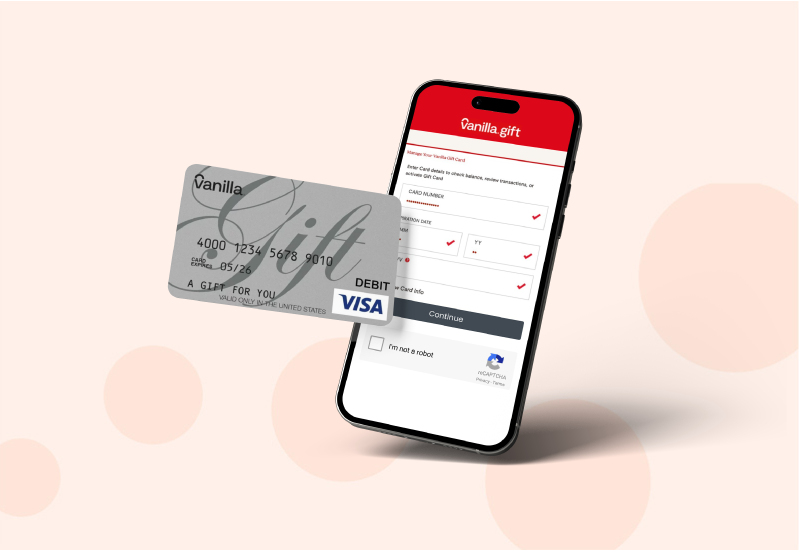
Knowing your available balance is crucial before buying anything online. You can check your Visa gift card balance easily by visiting the card issuer’s website or calling the toll-free number on the back of the card.
Many issuers also offer mobile apps that give you quick access to your balance and transaction history. This helps you track spending and avoid declined transactions at checkout.
Keep in mind that some online purchases might place a temporary hold on your card for an amount higher than the actual sale, especially for services like hotels or car rentals. This hold can reduce your visible balance temporarily, so plan accordingly.
Setting Up Your Card For Online Use
Setting up your Visa gift card for online use is a crucial first step to enjoy seamless shopping experiences. Without proper registration and activation, your card might not work when you try to make a purchase. Taking a few minutes to prepare your card ensures you avoid frustration during checkout.
Registering Your Card
Registering your Visa gift card links it to your personal information, making online transactions smoother. Visit the website printed on the back of your card to start the registration process. You’ll typically need to provide your card number, expiration date, and CVV code.
Adding your billing address during registration is important. Many websites require this to verify your identity and prevent fraud. If you skip this step, your transaction might be declined even if you have enough funds.
Think about this: have you ever had a payment rejected because your address didn’t match? Registering your card helps prevent that hassle. Keep your registration details accurate and up to date to avoid disruptions.
Activating Your Card
Activation is the next essential step after registration. Most Visa gift cards come inactive for security reasons until you activate them. Activation usually involves calling a toll-free number or visiting the card issuer’s website.
During activation, you may be asked to confirm the last four digits of your card number and the security code. This step verifies that you are the rightful owner. Without activation, your card balance won’t be available for online purchases.
Here’s a tip: activate your card right away after purchase to avoid forgetting and facing delays later. Activation can be quick and painless but skipping it means no online spending. How often do you check if your new cards are activated before trying to use them?
Making Online Purchases
Making online purchases with a Visa gift card is a straightforward way to shop without linking your personal bank account. These cards function much like credit or debit cards, allowing you to pay for goods and services on most websites. However, there are a few key points to keep in mind to ensure smooth transactions and avoid common pitfalls.
Visa Gift Card Payment Options
You can use your Visa gift card anywhere online that accepts Visa debit or credit cards. Most major retailers and service providers recognize these cards as valid payment methods.
- Enter the card number, expiration date, and CVV code during checkout just like with any other card.
- Some websites may require you to register your card online to link it to a billing address. This step helps avoid declines during purchase.
- Keep track of your card balance before buying to prevent transaction failures due to insufficient funds.
Using Your Card At Online Retailers
Before you start shopping, check if the retailer accepts Visa gift cards. Most large online stores do, but some smaller sites might not.
- When prompted for payment, select ‘credit card’ or ‘debit card’ as your payment type.
- Input the gift card details exactly as they appear, including the billing address if required.
- If your purchase exceeds the card balance, some sites allow split payments with another card or payment method.
Have you ever been stuck at checkout because your card was declined? Double-checking your balance and registration can save you that hassle.
Common Issues And Solutions
Sometimes transactions with Visa gift cards don’t go as planned. Understanding common issues can help you troubleshoot quickly.
| Issue | Cause | Solution |
|---|---|---|
| Transaction declined | Insufficient funds or unregistered card | Check balance and register the card online if needed |
| Billing address mismatch | Address entered doesn’t match card registration | Update the billing address on the card issuer’s site |
| Partial payment not accepted | Merchant does not support split payment | Use another payment method or reduce purchase amount |
Have you tried contacting the card issuer’s customer service for unresolved issues? They often provide quick fixes or reload options.

Credit: www.youtube.com
Security And Safety Precautions
Using Visa gift cards online offers convenience, but it also requires you to stay alert about security. Protecting your card information and keeping an eye on your account activity can prevent unauthorized use and save you from potential headaches. Let’s look at how you can keep your Visa gift card safe while shopping online.
Protecting Your Card Information
Think of your Visa gift card details like cash in your wallet. You wouldn’t share your PIN or hand over your money to strangers, so don’t share your card number, expiration date, or security code online unless the website is secure.
Always check for a URL starting with https://and look for a padlock icon in the address bar before entering your card details. Avoid using public Wi-Fi when making purchases; these networks are often less secure and can expose your information to hackers.
Keep your card in a safe place and write down the card number and customer service contact in case you lose it. If a website asks for more personal information than necessary, pause and reconsider the transaction.
Monitoring Your Account Activity
Even after a purchase, your responsibility doesn’t end. Regularly check your card balance and transaction history through the issuer’s website or app. This helps you spot any unfamiliar charges early.
Set reminders to review your account weekly if you use the card frequently. If you notice any suspicious transactions, contact the card issuer immediately to report fraud and freeze your card if needed.
Have you ever caught a small unauthorized charge early and avoided bigger problems? Staying vigilant can make all the difference between a minor inconvenience and a major security breach.
Managing Your Card Balance
Managing your Visa gift card balance is essential to make sure you don’t run out of funds unexpectedly while shopping online. Keeping track of how much money is left helps you plan your purchases and avoid declined transactions. It also helps prevent overspending and keeps your online shopping experience smooth.
Checking Your Balance
You can check your Visa gift card balance easily through several methods. Most cards allow you to visit the issuer’s website and enter your card number and security code to see the remaining balance.
Alternatively, you can call the toll-free number on the back of your card to get your balance over the phone. Some cards even offer mobile apps, making it simple to check your balance anytime, anywhere.
Have you ever tried to buy something online only to find out your card didn’t have enough funds? Checking your balance before shopping saves you that frustrating moment.
Tracking Your Spending
Tracking your spending on a Visa gift card helps you know exactly where your money goes. You can keep a simple list or spreadsheet to record each purchase and the amount spent.
Many online retailers send you receipts via email—save these to cross-check your spending. Some card issuers provide transaction histories on their websites or apps, showing detailed purchase records.
By tracking your spending, you avoid surprises and can stretch your gift card balance further. What’s the best way you’ve found to keep tabs on your online purchases?

Credit: www.youtube.com
When Your Card Runs Out
Running out of funds on your Visa gift card can be frustrating, especially if you still have online purchases to make. But don’t worry—there are practical ways to handle the leftover balance or even get some money back. Knowing what to do when your card runs out helps you make the most of every dollar loaded onto it.
Options For Unused Balances
Sometimes, your Visa gift card might have just a few cents or dollars left. You can check your balance online or by phone to see exactly how much you have remaining.
If the remaining amount isn’t enough to cover your full purchase, you can use a split payment method where you pay part of the bill with your gift card and the rest with another payment option. Many online stores accept this, but always confirm before checkout.
Another option is to save the leftover balance for future small purchases or to combine it with other gift cards if the retailer allows. Some websites even let you transfer your balance to another Visa gift card, making it easier to consolidate funds.
Returning A Card For Refund
Did you know you might be able to return an unused or partially used Visa gift card for a refund? Policies vary depending on where you bought the card, so it’s important to check the retailer’s terms.
Some stores allow returns if the card is unused and in original packaging. If you have proof of purchase, you could get a refund or store credit, which can be more flexible than a gift card balance.
If you’re thinking about this route, ask yourself: Is the hassle of returning the card worth the refund? Sometimes, using the card fully or combining its balance elsewhere saves more time and effort.
Credit: blog.sendcredit.com
Frequently Asked Questions
How Do I Use A Visa Gift Card Online?
To use a Visa gift card online, enter the card number, expiration date, and CVV at checkout. Register the card on the issuer’s website to add your billing address. Ensure the card balance covers the purchase total including taxes and shipping.
Can I Use Visa Gift Cards On All Websites?
Visa gift cards work on most websites that accept Visa debit cards. Some sites may restrict prepaid cards or require registration. Always check the card balance and website payment policy before purchasing to avoid declined transactions.
How Do I Check My Visa Gift Card Balance Online?
Visit the card issuer’s official website and enter your card number and PIN. You can also call the customer service number on the card’s back. Regularly checking balances helps avoid declined payments during online shopping.
What If My Purchase Exceeds The Visa Gift Card Balance?
If your purchase exceeds the card balance, the transaction may be declined. Use split payments if the website supports it, or add funds to the card if possible. Always verify your balance before completing online orders.
Conclusion
Visa gift cards work well for many online purchases. Just enter the card details during checkout. Keep track of your balance to avoid declines. Some sites may ask for a billing address. Use the card only on trusted websites. Always check expiration dates and fees.
This makes shopping easier and safer. Try using your Visa gift card today. Enjoy the convenience without extra hassle. Simple steps lead to smooth online payments.

Similar Posts































