How to Activate Apple Gift Card: Quick & Easy Guide
You’ve got an Apple Gift Card in your hand, and now it’s time to put it to good use. But how do you activate it quickly and without hassle?
Whether you received it as a gift or bought it for yourself, activating your Apple Gift Card is the first step to unlocking a world of apps, music, and more. In this guide, you’ll find simple, clear steps to activate your card right away.
Keep reading, and you’ll be ready to enjoy everything Apple has to offer in no time.
Credit: www.iphonelife.com
What Is An Apple Gift Card
Apple Gift Cards are a popular way to give someone the freedom to choose from a wide range of Apple products and services. Whether you’re treating yourself or gifting a loved one, understanding what an Apple Gift Card is will help you make the most of it.
What Is An Apple Gift Card?
An Apple Gift Card is a prepaid card that holds a specific monetary value. You can use it to purchase products like iPhones, iPads, Macs, or even digital content such as apps, music, movies, and iCloud storage.
Unlike traditional gift cards tied to a single store, Apple Gift Cards cover both physical Apple stores and the digital Apple ecosystem. This flexibility makes it a versatile gift for anyone who loves Apple technology.
Where Can You Use An Apple Gift Card?
Apple Gift Cards work across various Apple platforms:
- Apple Online Store
- Apple Retail Stores
- App Store and iTunes Store
- Apple Music, Apple TV+, and other subscription services
This broad acceptance means you can easily use your balance for hardware upgrades or entertainment purchases. Have you ever bought an app or subscription with a gift card? It’s a smooth and convenient way to pay without using a credit card.
How Does The Apple Gift Card Differ From Apple Store Gift Cards?
Apple Gift Cards combine the benefits of previous separate cards. Earlier, Apple Store Gift Cards were only usable for physical products, while iTunes Gift Cards were for digital content.
Now, the Apple Gift Card merges both, letting you spend on hardware, accessories, software, and subscriptions. This unified approach simplifies gift-giving and spending for Apple users.
Where To Buy Apple Gift Cards
Finding the right place to buy an Apple Gift Card can make your activation process smooth and hassle-free. You want a trusted source that offers both convenience and security. Let’s look at some popular places where you can purchase Apple Gift Cards easily.
Apple Online Store
The Apple Online Store is a straightforward option. You can buy digital or physical gift cards directly from Apple’s official website. The digital cards arrive instantly via email, which is perfect if you need a last-minute gift.
Authorized Retailers
Many authorized retailers carry Apple Gift Cards. Stores like Best Buy, Walmart, and Target often stock them in their gift card sections. These places offer the benefit of browsing in person and picking up the card immediately.
Supermarkets And Convenience Stores
Don’t overlook supermarkets and convenience stores. Chains such as CVS, Walgreens, and 7-Eleven usually have Apple Gift Cards near the checkout counters. This option is handy if you’re running errands and want to grab a card on the go.
Online Marketplaces
Websites like Amazon and eBay also sell Apple Gift Cards. However, you should be cautious and only buy from sellers with high ratings. This helps you avoid scams and ensures the card you receive is valid.
Mobile Carrier Stores
Your mobile carrier’s store might offer Apple Gift Cards too. Places like Verizon and AT&T sometimes have them available, which can be convenient if you’re updating your phone or accessories. It’s worth checking if you’re already visiting these stores.
Steps To Activate Apple Gift Card
Activating your Apple Gift Card is the first step to enjoying its benefits. The process is simple and can be done in several ways depending on what device or location you have available. Let’s walk through how you can activate your card quickly and easily.
Activate Online
To activate your Apple Gift Card online, visit the official Apple website. You’ll need to sign in with your Apple ID to link the card to your account.
- Go to the Apple Gift Card redemption page.
- Enter the 16-digit code found on the back of the card.
- Follow the prompts to confirm and add the balance.
Have you ever wondered how fast you can add funds without leaving your home? This method takes just a few minutes and works great if you’re busy or prefer digital options.
Activate Using Iphone Or Ipad
Activating your gift card using an iPhone or iPad is convenient and intuitive. Open the Wallet app or App Store on your device to get started.
- Open the App Store and tap your profile picture.
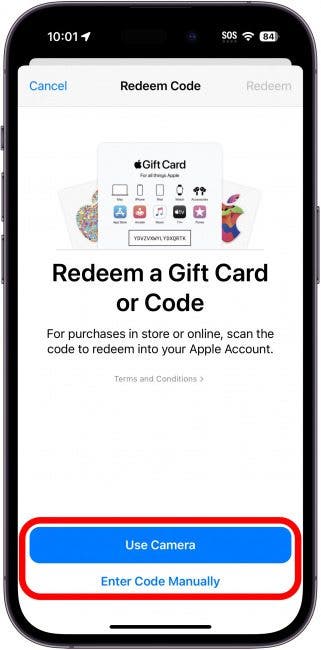
- Select “Redeem Gift Card or Code.”
- Use your device’s camera to scan the card or enter the code manually.
- Confirm the activation to add the balance instantly.
Many users appreciate how seamless this feels—no need to type long codes. Have you tried scanning your card with your phone? It’s a quick way to avoid errors.
Activate At Retail Stores
You can also activate your Apple Gift Card in person at Apple retail stores or authorized resellers. Just bring your card to the checkout counter.
- The store staff will scan your gift card.
- They will confirm activation and link it to your Apple ID if needed.
- You will receive a receipt confirming the activation.
Sometimes, speaking directly to a specialist can clear up any questions you might have. Have you found in-store help useful for complex tech tasks?
Credit: setapp.com
Troubleshooting Activation Issues
Activation issues with your Apple Gift Card can be frustrating, especially when you’re eager to use it. These problems often have simple fixes, but they require patience and a clear understanding of common pitfalls. Let’s dive into how you can identify and solve these hiccups quickly.
Common Problems
One of the most frequent issues is entering the wrong code. It’s easy to mix up characters like “0” and “O” or “1” and “I.” Double-check your code carefully before trying again.
Another obstacle is attempting to activate a card that’s already been redeemed or expired. Keep an eye on the card’s validity period and ensure it hasn’t been used previously.
Sometimes, activation fails due to connectivity problems. A weak or unstable internet connection can interrupt the process, so verify your network stability before trying again.
Have you ever tried activating your card on the wrong Apple platform? Remember, Apple Gift Cards work on specific devices or accounts. Confirm that you’re logged into the correct Apple ID and using the right device.
How To Contact Apple Support
If you’ve checked everything and the card still won’t activate, contacting Apple Support is your next step. Apple offers several easy ways to get help:
- Phone Support:Call Apple’s customer service directly for real-time assistance.
- Chat Support:Use the live chat feature on Apple’s website to describe your problem and get immediate help.
- Apple Support App:Download the app to schedule a call or chat with a specialist at your convenience.
- Visit an Apple Store:If possible, visit a nearby Apple Store for in-person help with your gift card.
When you contact support, have your gift card details ready. This speeds up the process and helps the representative resolve your issue faster. What’s the most frustrating gift card problem you’ve faced? Sharing it with support can often lead to tailored solutions.
Using Your Activated Apple Gift Card
Using your activated Apple Gift Card is simple and convenient. It lets you enjoy a wide range of digital content and products from Apple. Once activated, your balance is ready to spend across Apple platforms. This section explains how to use your gift card effectively.
Redeem In App Store And Itunes
Use your Apple Gift Card to buy apps, games, movies, and music. Open the App Store or iTunes Store on your device. Tap your profile icon and select “Redeem Gift Card or Code.” Enter the code from your gift card carefully. Your balance updates immediately after successful redemption.
With this balance, you can purchase:
- Apps and games
- Music albums and singles
- Movies and TV shows
- Books and audiobooks
Use For Apple Services And Products
Your Apple Gift Card balance also works for Apple services and products. It can pay for subscriptions like Apple Music, Apple TV+, and iCloud storage. When buying physical products from Apple’s online store, you can apply the gift card balance during checkout.
Steps to use your balance for services and products:
- Sign in with your Apple ID on your device
- Select the service or product you want to buy
- Choose your payment method and select your gift card balance
- Complete the purchase using your gift card funds
This makes managing payments easy and keeps your spending secure.
Safety Tips For Apple Gift Cards
Apple gift cards are a popular way to buy apps, music, and more. Protecting these cards is very important. Scammers often target gift cards. Follow these safety tips to keep your card secure and avoid fraud.
Keep Your Gift Card Code Private
Never share the gift card code with anyone. Treat the code like cash. Only enter the code on official Apple websites or apps. Avoid sending the code in emails or messages. Scammers may try to trick you into sharing it.
Buy Cards From Trusted Sellers
Purchase Apple gift cards only from authorized stores or Apple itself. Avoid buying from unknown websites or individuals. Fake or stolen cards may not work. Buying from trusted sellers reduces the risk of fraud.
Inspect The Card Before Activation
Check the card for signs of tampering. Make sure the scratch-off area is intact. Do not use cards with damaged or missing codes. Report any suspicious cards to the seller or Apple support immediately.
Activate The Card As Soon As Possible
Activate your Apple gift card right after purchase. Delaying activation may increase the chance of fraud. Activation links or steps are usually provided on the card or receipt. Follow instructions carefully to secure your balance.
Be Wary Of Unsolicited Requests
Ignore calls or messages asking for your gift card code. Apple will never ask for your card details by phone or email. Treat all unsolicited requests as scams. Report suspicious contacts to Apple or local authorities.

Credit: www.wikihow.com
Frequently Asked Questions
How Do I Activate An Apple Gift Card Online?
To activate an Apple Gift Card online, log in to your Apple ID account. Enter the card’s code in the redeem section. This adds the balance to your Apple account instantly, allowing purchases on the App Store or iTunes.
Can I Activate An Apple Gift Card Via Iphone?
Yes, you can activate an Apple Gift Card using your iPhone. Open the App Store app, tap your profile, select “Redeem Gift Card or Code,” and scan or enter the code manually to add the balance.
What Should I Do If My Apple Gift Card Won’t Activate?
If your Apple Gift Card won’t activate, check the code for errors. Ensure your internet connection is stable. Contact Apple Support if the problem persists, as the card might be damaged or invalid.
Is It Necessary To Activate Apple Gift Cards Immediately?
Activating Apple Gift Cards immediately is recommended to prevent loss or misuse. Once activated, the balance is added to your Apple ID and ready for use on Apple services.
Conclusion
Activating your Apple Gift Card is simple and quick. Just follow the easy steps shown above. Make sure to check the card balance after activation. Use it to buy apps, music, or other Apple products. Keep the card safe to avoid losing its value.
Now, enjoy shopping on your Apple device with confidence. No stress, no hassle. Just a few clicks and you’re done.

Similar Posts































