How to Give a Gift Card on Steam: Easy Guide
Looking to surprise your friend with a Steam gift card but not sure where to start? You’re in the right place.
Giving a gift card on Steam is easier than you think, and it can instantly brighten someone’s day with endless gaming possibilities. Whether it’s for a birthday, holiday, or just because, this guide will walk you through every simple step.
Keep reading to find out how you can make your gift stand out and bring joy to any gamer’s library.
Credit: blog.tbay.store
Choosing The Right Gift Card
Choosing the right gift card for Steam can make your present more special and useful. It ensures the receiver can enjoy games or items they want. The key is to understand the types of cards, the amount to give, and the regional rules. These factors help you pick the best option without confusion or mistakes.
Steam Gift Card Options
Steam offers various gift cards with different designs and values. You can find physical cards at stores or digital cards online. Both types add funds to the recipient’s Steam Wallet. The choice depends on what you think the receiver prefers. Digital cards arrive fast, while physical cards feel more personal.
Selecting The Amount
Gift cards come in several fixed amounts. Common values include $20, $50, and $100. Choose an amount that fits your budget and the receiver’s needs. Think about what games or items they might buy. A smaller amount works for casual players. Bigger amounts suit those who buy many games.
Checking Regional Availability
Steam gift cards work only in specific regions. Each card is tied to a country or currency. Make sure the card matches the recipient’s location. Using a card from the wrong region can cause errors. Check Steam’s official site or the seller’s details to confirm. This step avoids disappointment and wasted money.

Credit: store.steampowered.com
Purchasing A Steam Gift Card
Purchasing a Steam gift card is a straightforward way to share the joy of gaming with friends or family. Whether you prefer digital convenience or the tactile feel of a physical card, there are several ways to buy one. Each method offers its own perks depending on your needs and timing.
Buying Online
Buying a Steam gift card online is quick and convenient. You can purchase directly from the official Steam website or trusted digital marketplaces. After buying, the code is usually delivered instantly via email, so you can send it to your friend without delay.
Online purchases often let you choose from various card amounts, making it easier to fit your budget. Plus, you avoid the hassle of leaving your home. Have you ever sent a gift card last minute? This method saves you in those tight spots.
Buying In-store
If you prefer physical cards, many retail stores carry Steam gift cards. Places like game shops, supermarkets, and electronics stores usually stock them. Buying in-store allows you to pick up the card immediately and wrap it as a present.
Keep in mind, physical cards come with a scratch-off code on the back. You’ll need to carefully reveal it without damage to redeem. Buying in person also gives you a chance to ask store staff any questions you might have.
Using Third-party Retailers
Third-party retailers often sell Steam gift cards, both online and offline. Websites like Amazon or specialized gaming stores can be options. However, be cautious and buy only from reputable sellers to avoid scams or invalid codes.
Prices might vary slightly, and sometimes you’ll find promotions or discounts that make this option attractive. Have you checked if your favorite retailer offers loyalty points or cashback on gift card purchases? This could add extra value to your gift.
Sending A Steam Gift Card
Sending a Steam gift card lets you share the joy of gaming easily. It offers flexibility to friends or family, allowing them to choose their favorite games or content. The process is simple and can be done in several ways. Understanding these options helps you pick the best way to send a Steam gift card.
Redeeming Codes Vs. Sending Directly
Steam gift cards come as codes or direct gifts. Redeeming codes means giving the receiver a unique code. They enter it on Steam to add funds to their wallet. Sending directly means gifting through Steam itself. The recipient gets a notification and can accept the gift immediately. Both methods are secure and easy to use. Codes work well for physical cards or when emailing yourself first. Direct sending is faster and more personal.
Using Steam Wallet Gifts
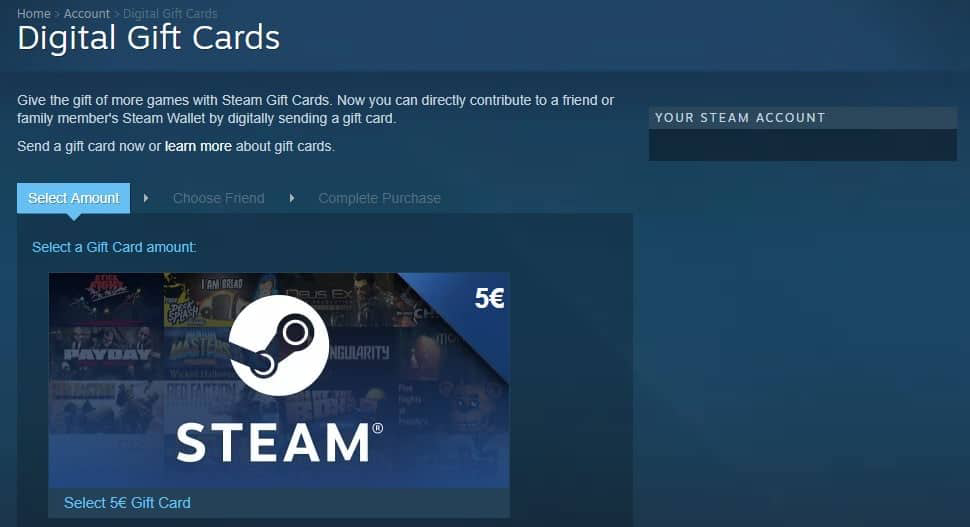
Steam Wallet gifts add funds directly to the recipient’s Steam account. Choose the amount you want to gift. Pick a friend from your Steam friends list to send it to. The gift appears in their wallet balance once accepted. This method removes the need for codes or extra steps. It is ideal for quick gifting during sales or special occasions.
Email And Physical Delivery Options
Steam gift cards can be delivered by email or as physical cards. Email delivery sends a digital code instantly. It suits last-minute gifts or distant friends. Physical cards come as plastic cards from stores. These include a code on the back to redeem. They offer a tangible gift experience, perfect for in-person giving. Both delivery options are convenient and trusted by Steam users.
Redeeming A Steam Gift Card
Redeeming a Steam gift card is a quick way to add funds to your Steam Wallet. This allows you to buy games, software, or other items on the Steam platform. The process is simple and can be done on both the Steam app and website. Follow these steps to redeem your gift card and start shopping.
Entering The Code On Steam
Open your Steam client or visit the Steam website. Log in to your account. Find the option called “Redeem a Steam Wallet Code” under the “Games” menu. Type the code from your gift card carefully. Double-check for any mistakes before submitting. Click “Continue” to add the funds to your wallet. You will see a confirmation message once it is successful.
Troubleshooting Common Issues
Sometimes, the code may not work right away. Check if the code is entered correctly without extra spaces. Make sure the gift card is activated and not expired. If you see an error, try restarting Steam and entering the code again. Contact Steam Support if problems persist. Keep your gift card receipt handy for proof of purchase.
Checking Wallet Balance
After redeeming, check your wallet balance to confirm the funds are added. Go to your profile and click “Account Details.” Your current Steam Wallet balance shows at the top of the page. Use this balance for your next purchase. It updates instantly after successful redemption.
Tips For A Smooth Gifting Experience
Giving a gift card on Steam can be a fantastic way to share gaming experiences with friends or family. To make sure your gift reaches the recipient without any hiccups, you need to pay attention to some key details. These tips will help you avoid common pitfalls and add a personal touch that makes your gift stand out.
Avoiding Scams And Fraud
Always buy Steam gift cards from official sources like the Steam store or trusted retailers. Third-party sellers may offer discounts that seem too good to be true—often, they are. Scammers can send fake codes or steal your money without delivering a valid card.
Double-check the recipient’s email address before sending the gift to avoid sending it to the wrong person. Steam also has built-in fraud detection, but your caution adds an extra layer of security. Have you ever received a suspicious gift card? That’s a red flag to stay vigilant.
Gift Card Expiry And Limitations
Steam gift cards generally don’t expire, but some regional restrictions may apply. For instance, a gift card purchased in one country might not work in another. Always confirm the card’s region compatibility with the recipient’s Steam account location.
Check the card’s balance before sending it to ensure it matches the amount you intend to gift. Keep in mind that Steam gift cards cannot be redeemed for cash or transferred between accounts once activated. Knowing these limits helps you avoid awkward surprises.
Personalizing Your Gift
Add a heartfelt message when sending the gift card through Steam. A simple note can make the gift feel much more special than just a code. Think about what games or genres the recipient loves and mention why you chose this gift for them.
If you’re gifting in person, consider packaging the card with a printed note or a small token related to their favorite game. Personal touches show you put thought into your gift, not just money. How can your message make the recipient’s day better?

Credit: store.steampowered.com
Frequently Asked Questions
How Do I Send A Steam Gift Card?
To send a Steam gift card, buy it from Steam or a retailer. Then, select “Send as Gift” and enter the recipient’s email or Steam username.
Can I Personalize A Steam Gift Card Message?
Yes, Steam allows you to add a personalized message when gifting. This message appears with the gift notification to the recipient.
Are Steam Gift Cards Region-locked?
Yes, Steam gift cards are region-locked. You must buy and send a gift card matching the recipient’s country to avoid issues.
How Long Does It Take For Steam Gifts To Deliver?
Steam gift cards are delivered instantly via email or Steam chat once purchased and sent.
Conclusion
Giving a gift card on Steam is simple and fast. Just follow the steps carefully to avoid mistakes. The recipient can choose games or items they like. It makes a perfect gift for gamers. Sending a Steam gift card shows you care.
Everyone enjoys getting something they want. Keep your account secure while sending gifts. Now, you are ready to surprise your friends with Steam gift cards. Happy gifting!

Similar Posts































