How to Make a Manifest Json File Minecraft: Ultimate Guide

Are you ready to bring your Minecraft creations to life with custom features? Making a manifest JSON file is the key step to unlocking exciting mods, textures, and add-ons.
If you’ve ever wondered how to create this essential file but felt overwhelmed by coding, you’re in the right place. This guide will walk you through every step, using clear and simple language, so you can start customizing your Minecraft experience like a pro.
Keep reading, and by the end, you’ll have the confidence to build your own manifest JSON file and transform your game!
What Is A Manifest Json File
A Manifest JSON file is a small but vital file in Minecraft. It tells the game important details about your add-on or resource pack. This file helps Minecraft recognize your content and use it properly.
The Manifest JSON file acts like an ID card. It contains information such as the add-on’s name, version, and description. This information lets Minecraft know what your add-on is and how to load it.
Purpose Of A Manifest Json File
The main purpose is to provide Minecraft with metadata. Metadata means data about the data in your add-on. Minecraft reads this file first to understand your pack.
Without a manifest, your add-on may not work or load correctly. It ensures your content is compatible with the game version.
Basic Structure Of A Manifest Json File
The file is written in JSON format. JSON uses key-value pairs to store data. It is easy to read for both humans and computers.
Typical keys include:
- format_version:Defines the version of the manifest format.
- header:Contains basic info like name and version.
- modules:Lists the parts of your add-on.
- dependencies:Shows any required add-ons.
Why The Manifest File Matters In Minecraft
This file ensures your add-on fits into Minecraft’s system. It helps avoid errors during loading. The game uses it to check compatibility and details.
It also allows you to manage versions and updates easily. Minecraft uses the manifest to keep track of your add-on’s identity.

Credit: www.youtube.com
Essential Components Of Manifest Json
The manifest.json file is crucial for creating Minecraft add-ons. It tells the game important information about your add-on. This file has several key parts that you must include. Each part has its role in defining how your add-on works.
Understanding these parts helps you build a proper manifest.json file. It ensures your add-on runs smoothly in Minecraft. Below are the essential components you need to know.
Header Section
The header section is the first part of the manifest.json file. It contains basic information about your add-on.
- name: The name of your add-on.
- description: A short summary of what your add-on does.
- uuid: A unique identifier for your add-on. Use a UUID generator to create this.
- version: The version number of your add-on, usually in three parts (e.g., 1.0.0).
- min_engine_version: The minimum Minecraft version needed to run your add-on.
Modules Section
The modules section defines the parts of your add-on. It tells Minecraft what your add-on contains and how to use it.
- type: Usually set to “resources” or “data” depending on the add-on.
- uuid: Another unique ID for this module.
- version: The version of this module, matching the header version.
- description: Optional, describes the module.
Dependencies Section
The dependencies section lists other add-ons your add-on needs to work. This is important when your add-on builds on other packs.
- uuid: The unique ID of the required add-on.
- version: The version of the required add-on.
Setting Up Your Workspace
Before creating a manifest JSON file for Minecraft, prepare your workspace carefully. A neat workspace speeds up your work and reduces errors. Organize your tools and files well for smooth progress.
Required Tools
Gather the right tools to build your manifest file with ease. Use a simple text editor like Notepad or a code editor such as Visual Studio Code. These editors highlight JSON syntax and help catch mistakes early.
Also, have a JSON validator ready online or as a software tool. It checks your manifest file for errors and ensures it meets Minecraft’s format.
- Text editor (Notepad, Visual Studio Code, Sublime Text)
- JSON validator (online tools like JSONLint)
- Basic knowledge of JSON format
Folder Structure
Organize your files in a clear folder structure. This helps Minecraft locate all parts of your add-on easily. Create a main folder for your project.
Inside the main folder, add these subfolders:
- behavior_packs– For behavior files
- resource_packs– For textures and sounds
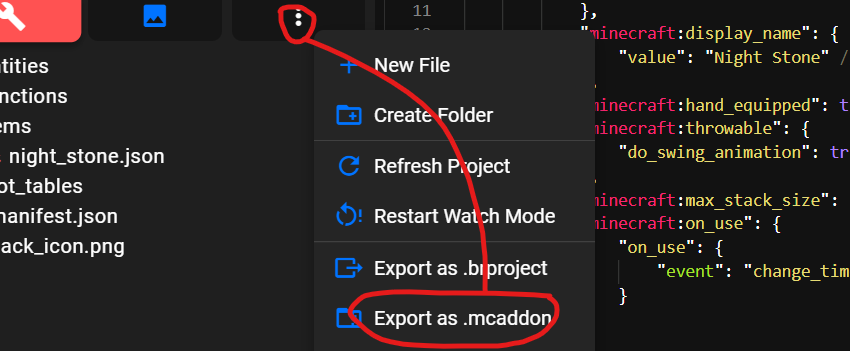
Keep your manifest.json file in the main folder. This keeps your project tidy and easy to manage. Clear folder structure avoids confusion during development.
Credit: medium.com
Creating The Manifest Json File
Creating the manifest.json file is a key step in making Minecraft add-ons. This file tells the game important information about your add-on. It defines what your add-on does and how it works with other parts of the game. The manifest.json file is written in JSON format, which is easy to read and edit.
Start by opening a plain text editor. Save the file as manifest.jsoninside your add-on folder. The file must follow a specific structure. Below, learn how to write each part clearly and correctly.
Writing The Header
The header is the first part of your manifest file. It gives the basic info about your add-on. This info includes the add-on’s name, description, and version.
Use this simple format for the header:
{ "format_version": 2, "header": { "name": "Your Add-on Name", "description": "Short description here", "uuid": "unique-uuid-here", "version": [1, 0, 0], "min_engine_version": [1, 16, 0] } }- format_versionmust be 2 for Minecraft Bedrock.
- uuidis a unique identifier. Generate it online.
- versionuses three numbers: major, minor, patch.
- min_engine_versiontells Minecraft the minimum game version needed.
Adding Modules
Modules define what your add-on contains. Each module tells Minecraft if it has behavior or resources. You can add many modules in the manifest.
Modules look like this:
"modules": [ { "type": "data", "uuid": "another-unique-uuid", "version": [1, 0, 0] } ]- typecan be
datafor behavior orresourcesfor textures and models. - uuidmust be unique for each module.
- versionmatches the module version.
Specifying Dependencies
Dependencies tell Minecraft if your add-on needs other add-ons to work. This section helps avoid conflicts and errors.
Use the dependenciesarray to list required add-ons:
"dependencies": [ { "uuid": "dependency-uuid-here", "version": [1, 0, 0] } ]- Each dependency requires a uuidand version.
- Leave empty if your add-on has no dependencies.
Common Errors And Fixes
Creating a manifest.json file for Minecraft can be tricky, especially if you run into errors that stop your add-on from working. Understanding the common mistakes helps you fix problems quickly and saves time. Let’s look at the typical issues people face and how you can avoid them.
Syntax Issues
One of the most frequent errors is related to syntax. Missing commas, misplaced brackets, or incorrect quotation marks can cause Minecraft to reject your manifest file.
- Check that every key and value pair is separated by a comma, except the last one in an object.
- Make sure all strings use double quotes (” “), not single quotes (‘ ‘).
- Verify that every opening curly brace { has a matching closing brace }.
I once spent hours debugging my manifest because I forgot a comma after the “modules” section. A simple syntax check with a JSON validator tool saved me then. Have you tried validating your JSON online before testing it in Minecraft?
Version Conflicts
Another common error comes from version mismatches. Minecraft updates often change how manifest files should be structured, so using outdated version numbers can cause errors.
- Ensure the “format_version” matches the version supported by your Minecraft edition.
- Verify that the “min_engine_version” and “version” fields are compatible with your game version.
- Check the official Minecraft documentation for the latest required values.
Ignoring version details led me to a frustrating moment where my add-on loaded incorrectly. Updating the version fields fixed the problem immediately. Are you confident your manifest reflects the latest Minecraft update?

Credit: www.youtube.com
Testing Your Manifest Json
Testing your manifest.json file is crucial to ensure your Minecraft add-on works smoothly. Without proper testing, small mistakes in your JSON code can cause the game to crash or fail to load your content. Let’s walk through how to load your manifest in Minecraft and troubleshoot common issues effectively.
Loading In Minecraft
First, save your manifest.json inside your add-on folder. Make sure your folder structure matches Minecraft’s requirements exactly. Then, open Minecraft and go to the “Settings” menu.
Navigate to “Storage” and locate your add-on folder. You can also import your add-on through the “Behavior Packs” or “Resource Packs” sections in the world settings. Activate the pack to see if Minecraft recognizes your manifest.
If your add-on appears, try loading a world that uses it. Watch for any error messages or missing features. This quick test shows whether your manifest.json is correctly configured and linked.
Troubleshooting
If your manifest doesn’t load, check for common errors in your JSON syntax. Missing commas, incorrect brackets, or typos in property names can break the file. Use an online JSON validator to catch these mistakes fast.
Verify your UUIDs are unique and correctly formatted. Minecraft uses UUIDs to identify your add-on, and duplicates can cause conflicts. If you’re stuck, regenerate new UUIDs using a reliable tool and update the manifest accordingly.
Sometimes, your manifest might load, but the add-on behaves oddly. Check your version numbers for compatibility with your Minecraft version. Inconsistent or unsupported versioning often leads to unexpected results.
Have you ever spent hours troubleshooting a tiny JSON error? It’s frustrating but teaches you to double-check every detail. Share your debugging stories—what unexpected fixes worked for you?
Tips For Advanced Customization
Diving into advanced customization of your Minecraft manifest JSON file can elevate your mod or resource pack from basic to exceptional. It lets you control every detail, making your creation truly unique and optimized. Here are some tips to help you push your manifest file beyond the basics.
Use Custom Module Types For Better Organization
Instead of sticking with the default module types like “resources” or “data,” try defining your own. Custom module types help you keep your files organized and clarify the purpose of each section.
For example, if your mod includes special sounds, create a module type named “custom_sounds.” This makes future updates easier since you know exactly where to add or change files.
Leverage Dependencies To Ensure Compatibility
You can specify dependencies in your manifest to make sure your add-on works only if certain other mods or packs are present. This prevents conflicts and errors in gameplay.
Think about a mod that adds new mobs. It might depend on a base mod that defines those mobs’ behaviors. Adding a dependency ensures players won’t face missing content or crashes.
Include Metadata For Better User Experience
Adding detailed metadata fields like version, description, author, and contact information helps users understand your creation better. It also aids in managing updates and reporting issues.
Try writing clear, concise descriptions that highlight unique features. You could even add a website or social media link for support or feedback.
Optimize The Format With Comments And Whitespace
Though JSON doesn’t officially support comments, you can use specific fields for notes to remind yourself or collaborators of important details. Proper spacing and indentation also make your manifest easier to read.
Keeping your file clean helps when you revisit it after a break or share it with others. Have you ever lost track of why you set a value a certain way? Notes can save you time.
Test Changes Incrementally To Avoid Issues
After every significant edit, test your manifest file in Minecraft. Small, incremental tests help catch errors early and prevent frustration.
For instance, after adding a new module or dependency, load the game to check if everything works as expected. This habit saves hours of troubleshooting later.
Frequently Asked Questions
What Is A Manifest.json File In Minecraft?
A manifest. json file defines your Minecraft add-on’s metadata. It includes information like name, version, and UUIDs. This file helps Minecraft recognize and load your custom content correctly.
How Do I Create A Manifest.json File For Minecraft?
Use a text editor to create a manifest. json file. Include required fields like format_version, header, and modules. Save the file in your Minecraft add-on folder for proper functionality.
What Are The Essential Fields In Manifest.json?
The essential fields are format_version, header, and modules. Header contains name, description, and UUIDs. Modules define the type and version of your add-on components.
Why Is Uuid Important In Manifest.json?
UUIDs uniquely identify your add-on components. They prevent conflicts with other add-ons. Always generate new UUIDs for each manifest to ensure uniqueness.
Conclusion
Creating a manifest JSON file for Minecraft is simple and useful. It helps the game read your add-ons correctly. Just follow the steps carefully and check for errors. This file keeps your mods organized and working well. Practice a few times to get confident.
Soon, you will create files without trouble. Enjoy customizing Minecraft with your own add-ons! Keep experimenting and learning.

Similar Posts