How Do You Use a Visa Gift Card Online: Easy Steps to Pay Securely
Have you ever wondered how to use a Visa gift card online without any hassle? Whether you received one as a gift or bought it for yourself, knowing the simple steps can save you time and frustration.
You’ll discover exactly how to activate your card, make purchases, and manage your balance with ease. By the end, you’ll feel confident using your Visa gift card anywhere online—turning it into a powerful tool for shopping, paying bills, or even gifting.
Keep reading to unlock the full potential of your card!
Understanding Visa Gift Cards
Understanding Visa gift cards helps you use them confidently online. These cards offer a flexible way to pay without a bank account. Many people choose them for gifts or personal spending. Knowing what they are and how they work clears up confusion.
What Is A Visa Gift Card?
A Visa gift card looks like a regular credit card. It carries the Visa logo and works wherever Visa is accepted. You can buy it with a set amount of money. The cardholder spends up to that amount only.
Unlike debit or credit cards, it is prepaid. You do not link it to a bank account. The card’s value decreases as you use it. It cannot go into a negative balance.
How Visa Gift Cards Work
Visa gift cards use the same technology as credit cards. Swipe, insert, or enter the card details online. The system checks your card balance before approving payment.
Each time you make a purchase, the amount is deducted from the card. You can use the card multiple times until the balance reaches zero. Some cards allow checking the balance online or by phone.
For online use, enter the card number, expiration date, and security code. Sometimes, you must register the card with your address. This matches the billing information for payment approval.
Credit: blog.sendcredit.com
Activating Your Visa Gift Card
Activating your Visa gift card is the first essential step before you can use it online. Without activation, the card remains inactive and won’t process any transactions. Understanding how to activate your card ensures a smooth shopping experience and helps avoid unnecessary delays.
Checking The Activation Process
Most Visa gift cards come with clear instructions on how to activate them, usually found on the back of the card or included in the packaging. Typically, you’ll need to visit a specific website or call a toll-free number to activate your card.
Sometimes, activation happens automatically at the point of purchase, but it’s always safer to verify. Have you ever tried to use a gift card only to find it wasn’t activated? That frustrating moment can be avoided by double-checking right after you receive it.
Ensuring Funds Availability
After activation, the next important step is to confirm that the funds are loaded onto your card. You can do this by checking your balance online or via the phone service provided by the card issuer.
Knowing your available balance helps you avoid declined transactions during checkout. Keep in mind, some cards may have activation fees or hold a small amount for processing, so the available funds might be slightly less than the card’s face value.
Using Visa Gift Cards Online
Using Visa gift cards online is simple and convenient. These cards work like regular credit or debit cards. You can shop on many websites without needing a bank account. Just follow a few easy steps to pay securely.
Selecting Payment Option
Choose the payment method at checkout. Look for options like “Credit Card” or “Debit Card.” Do not select “PayPal” unless your card links to it. Some websites also list “Gift Card” as a choice. Make sure the site accepts Visa cards.
Entering Card Information
Enter your card number exactly as shown on the card. Fill in the expiration date and CVV code. The CVV is the three-digit number on the back. Use your name or the name on the card if asked. Provide your billing address if required. This helps verify your card and avoid errors.

Credit: blog.xoxoday.com
Common Issues And Solutions
Using a Visa gift card online can sometimes bring up unexpected challenges. These common issues might stop your purchase or confuse you about the card’s remaining balance. Understanding how to quickly fix these problems ensures a smooth shopping experience without frustration.
Troubleshooting Declined Transactions
Declined transactions can happen even if you have enough funds on your card. One frequent cause is not registering your card with your billing address before making a purchase. Many online stores require the address linked to the card to match the one entered during checkout.
If your transaction is declined, double-check that you’ve added your name and billing address on the card issuer’s website. Also, confirm the merchant accepts Visa gift cards, as some only take credit or debit cards.
Another common issue is trying to buy something that costs more than the card’s remaining balance. Splitting the payment or purchasing a lower-priced item can help. Have you ever been caught off guard by a declined transaction despite having money on your card? Taking a moment to verify these details can save you from that hassle.
Resolving Balance Discrepancies
It’s normal to wonder why your card balance doesn’t match your expectations after several purchases. Sometimes, pending transactions can temporarily reduce your available balance until the merchant completes the payment.
If your balance seems off, log in to the card issuer’s website or call their customer service to get an updated statement. Keep a record of your purchases and compare them with the transactions listed online.
Occasionally, small authorization holds by merchants can cause confusion. These holds usually disappear within a few days, restoring the full balance. Have you checked your transaction history recently to spot any pending charges or unexpected holds?
Security Measures
Using a Visa gift card online requires extra care to keep your money safe. Security measures protect your card details and prevent fraud. Follow simple steps to guard your card and avoid scams. These tips help you shop with peace of mind.
Protecting Your Card Information
Never share your card number or security code with others. Use your card only on trusted websites with secure connections. Look for “https://” in the web address and a padlock icon. Keep your card details private and avoid saving them on public devices.
Write down your card number and PIN in a safe place. Check your card balance regularly for unusual activity. If you see anything strange, report it immediately to the card issuer.
Avoiding Online Scams
Beware of fake emails or messages asking for your card information. Do not click on suspicious links or download unknown files. Always enter your card details on official websites, not through pop-ups or ads.
Use strong passwords for your online accounts. Enable two-factor authentication when possible. Avoid using public Wi-Fi to shop online. These steps reduce the risk of your card being hacked or stolen.
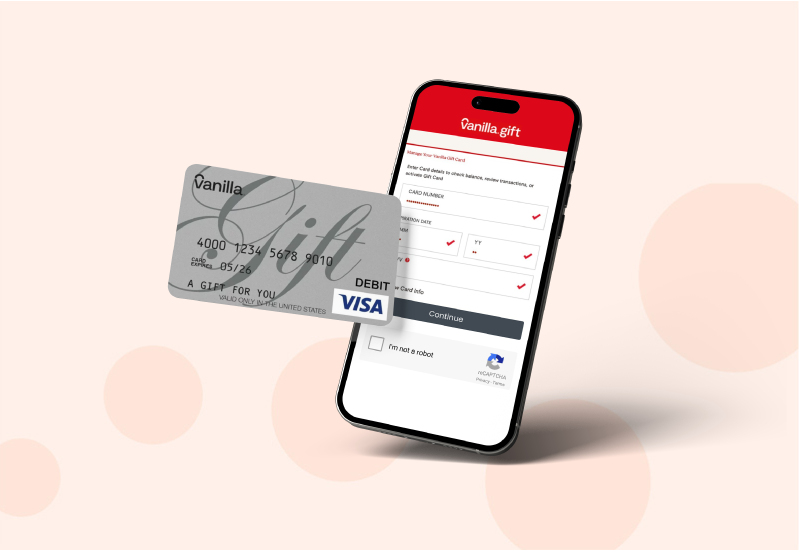
Credit: blog.sendcredit.com
Benefits Of Using Visa Gift Cards Online
Using Visa gift cards online offers several benefits that can make your shopping experience smoother and more secure. These cards provide a practical alternative to cash or credit cards, especially if you want to control your spending or avoid sharing your personal bank details. Let’s look at some key advantages that might change how you approach online purchases.
Convenience And Flexibility
Visa gift cards work almost like debit or credit cards, allowing you to shop at millions of online stores worldwide. You don’t need to open a new account or link these cards to your bank, which means fewer hoops to jump through before making a purchase.
Think about the last time you wanted to buy something online but hesitated because you didn’t want to use your main card. A Visa gift card solves that problem instantly. You can also use it for subscriptions, digital downloads, or even travel bookings, giving you the freedom to spend how and where you want.
Budget-friendly Shopping
One of the best reasons to use Visa gift cards online is the ability to stick to a budget. Since the card has a fixed amount loaded onto it, you can avoid overspending and keep better track of your expenses.
Imagine planning a gift or a special treat and deciding exactly how much you want to spend upfront. With a Visa gift card, you won’t have to worry about surprise charges or interest fees. It’s a simple way to control your spending without complicated budget apps or reminders.
Frequently Asked Questions
How Do I Activate A Visa Gift Card For Online Use?
You usually activate your Visa gift card by following instructions on the card packaging. Activation may require calling a number or visiting a website. Ensure the card is registered before making online purchases.
Can I Use A Visa Gift Card On Any Online Store?
Yes, you can use a Visa gift card on most online stores that accept Visa payments. However, some merchants might restrict prepaid cards. Always check the store’s payment policy before purchasing.
How Do I Add A Visa Gift Card To Digital Wallets?
To add your Visa gift card to digital wallets, enter the card number, expiration date, and CVV. This allows quick online payments through apps like Apple Pay or Google Pay, improving convenience and security.
What Happens If My Online Purchase Exceeds My Visa Gift Card Balance?
If your purchase is more than your card balance, the transaction may be declined. Some sites allow split payments; otherwise, add funds or use an alternative payment method for the remaining amount.
Conclusion
Using a Visa gift card online is simple and safe. Just enter the card details during checkout. Keep track of your balance to avoid declined payments. Many websites accept Visa gift cards like a credit card. Remember to register your card if needed for smoother use.
This helps protect your money and makes shopping easier. Enjoy the freedom to shop without using your bank account. Practice these tips to make the most out of your Visa gift card. Shopping online can be quick and stress-free with the right steps.

Similar Posts































