How to Use Itunes Gift Card: Ultimate Guide to Maximize Benefits
Have you ever wondered how to get the most out of your iTunes Gift Card? Whether you received one as a gift or bought it for yourself, knowing exactly how to use it can open up a world of music, apps, movies, and more right at your fingertips.
In this guide, you’ll discover simple steps to redeem your card quickly and smart tips to make your balance go further. Keep reading, and you’ll unlock the full potential of your iTunes Gift Card without any hassle.
Activating Your Itunes Gift Card
Activating your iTunes Gift Card is a simple process. It allows you to add credit to your Apple ID. This credit can buy apps, music, movies, and more. Knowing how to activate the card quickly helps you enjoy your new balance without delay.
Checking Card Balance
Before redeeming, check your card balance. Visit the official Apple website or use the App Store. Enter your card code carefully to see the remaining amount. This helps avoid errors and keeps track of your funds.
Redeeming On Ios Devices
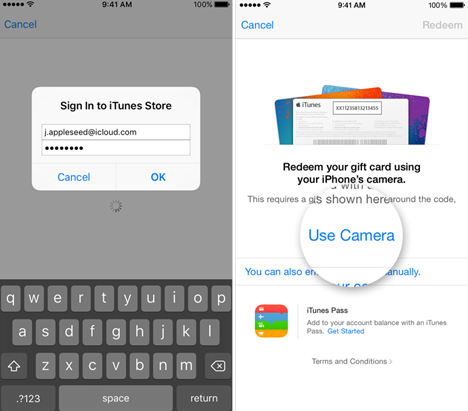
Open the App Store on your iPhone or iPad. Tap your profile icon at the top right. Select “Redeem Gift Card or Code.” Use the camera to scan the card or enter the code manually. Confirm the redemption to add credit to your account.
Redeeming On Mac Or Pc
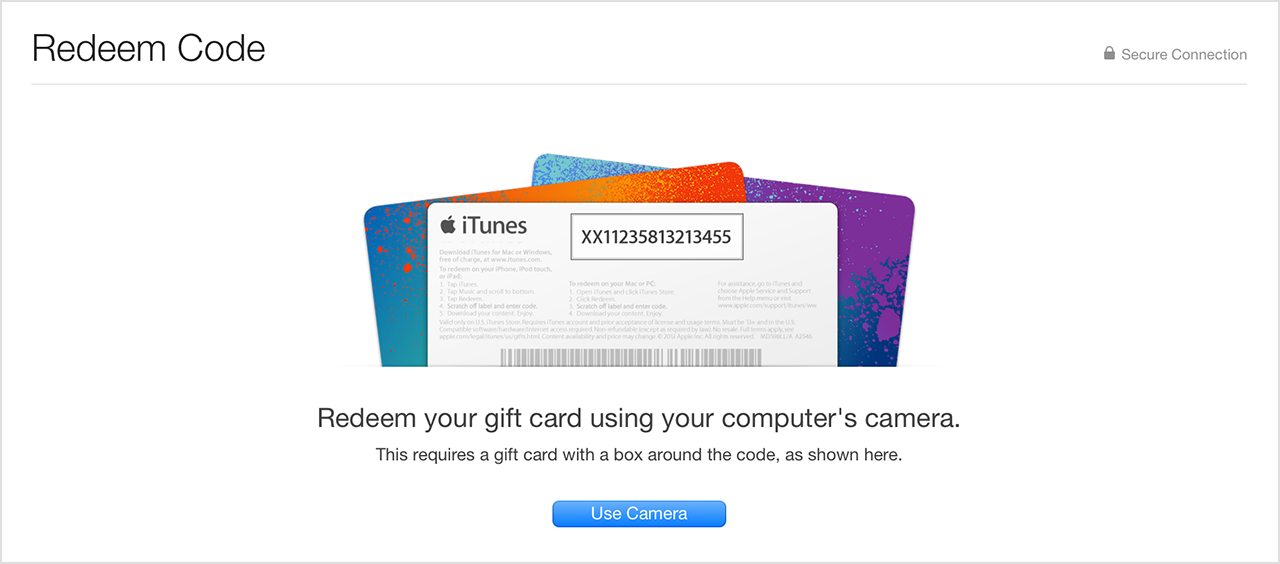
Launch the Apple Music or iTunes app on your computer. Click on the “Account” menu and choose “Redeem.” Sign in with your Apple ID if needed. Enter the gift card code carefully and confirm. The balance updates immediately for use.

Credit: medium.com
Purchasing Apps And Games
Purchasing apps and games with an iTunes Gift Card is simple and fun. The card adds credit to your Apple ID, which you can spend on apps and games from the App Store. It lets you explore a wide variety of options without using a credit card. This way, you control your spending and enjoy the content you love.
Top App Recommendations
Find popular apps to enhance your daily life. Try apps for productivity like note-taking or calendar planners. Explore creative tools for photo editing and music making. Social media apps keep you connected with friends and family. Educational apps help learn new skills or languages. Entertainment apps stream movies, music, and podcasts. These apps offer great value for your iTunes credit.
Exploring Game Categories
Games on the App Store come in many types. Action games offer fast-paced challenges and excitement. Puzzle games test your thinking and problem-solving skills. Adventure games tell stories and invite exploration. Strategy games require planning and smart moves. Casual games are easy to play anytime, anywhere. Each category has free and paid options. Use your iTunes Gift Card credit to try new games and find your favorite.
Buying Music And Movies
Buying music and movies with an iTunes Gift Card is simple and fun. The card adds credit to your Apple ID balance. Use this balance to purchase songs, albums, or films directly from the iTunes Store. This way, you avoid using a credit card. Enjoy a wide selection of digital entertainment available at your fingertips.
Finding New Releases
The iTunes Store updates its new releases section regularly. Check this area to discover the latest music and movies. New albums from popular artists appear here first. Fresh movies also debut in this section. Use the “New Releases” tab to stay current with trending content. This keeps your collection fresh and exciting.
Exploring Genres
iTunes organizes music and movies by genre. This makes it easy to find what fits your taste. Genres include pop, rock, jazz, classical, and more. Movie genres cover action, comedy, drama, and others. Browse these categories to explore new styles. Enjoy discovering entertainment that matches your mood or interest.
Credit: medium.com
Subscribing To Services
Using your iTunes Gift Card to subscribe to Apple services is a smart way to manage your entertainment and storage needs without directly using your credit card. It lets you control your spending while enjoying premium features tailored just for you. Let’s see how you can easily apply your gift card balance to popular subscriptions.
Apple Music Subscription
Apple Music offers millions of songs and curated playlists, all ad-free. You can use your iTunes Gift Card balance to pay for monthly or yearly Apple Music subscriptions, which is perfect if you want to avoid linking a credit card.
To subscribe with your gift card balance:
- Open the Apple Music app on your device.
- Go to the subscription section and select your preferred plan.
- During payment, choose to use your Apple ID balance instead of other payment methods.
This approach lets you enjoy high-quality music streaming without worrying about unexpected charges. Have you ever found yourself skipping songs because of ads? Using your gift card to subscribe removes that barrier.
Icloud Storage Plans
Running out of iCloud storage can be frustrating, especially when you need to back up photos, documents, and app data. Your iTunes Gift Card balance can cover the cost of upgrading your iCloud storage plan, making it easier to keep your data safe.
Here’s how to apply your balance:
- Open Settings on your iPhone or iPad.
- Tap your name, then select “iCloud” and “Manage Storage” or “Change Storage Plan.”
- Choose a plan and select payment via your Apple ID balance.
Using your gift card for this service means you won’t have to link a bank account or credit card, giving you peace of mind. What’s your biggest reason for needing extra storage? Sharing your answer might help others decide on the right plan.
Gift Card Tips And Tricks
Gift cards are a handy way to shop on iTunes. Using them wisely helps you save money and enjoy more content. Here are useful tips and tricks for better use of your iTunes gift card.
Tracking Expenditures
Keep an eye on your spending to avoid surprises. Track how much balance you use after each purchase. This practice helps you plan your next buys carefully.
- Check your gift card balance regularly in the iTunes app.
- Write down every purchase made with the card.
- Use a simple spreadsheet or notes app to log expenses.
- Set a monthly budget for iTunes spending.
Tracking your expenses helps you stay within budget and use your gift card efficiently.
Special Promotions
Watch for special offers that boost your gift card value. Some retailers add extra credit during holidays or events. These promotions give you more to spend for the same price.
- Sign up for newsletters from stores selling iTunes cards.
- Follow official social media pages for announcements.
- Check online deal websites before buying a card.
- Look out for bundled offers with discounts or bonuses.
Taking advantage of promotions can stretch your gift card dollars further.
Common Issues And Solutions
Using an iTunes gift card is simple, but some issues can arise during the process. Problems may occur during redemption or while trying to use the credit. Knowing common issues and their solutions helps you save time and avoid frustration.
Most problems involve incorrect codes, account restrictions, or network errors. Many issues resolve quickly with a few steps. Keep patience and follow easy troubleshooting tips to fix most errors fast.
Troubleshooting Redemption Problems
- Check the code carefully. Make sure no letters or numbers are wrong.
- Confirm the card is activated and not expired.
- Ensure your device is connected to the internet.
- Sign out and sign back into your Apple ID.
- Update your iTunes or App Store app to the latest version.
- Try redeeming the card on another device or computer.
- Verify your country or region matches the card’s origin.
Contacting Support
If problems continue, contact Apple Support for help. Prepare these details before reaching out:
- Gift card number and barcode
- Receipt or proof of purchase
- Your Apple ID email address
- Description of the issue and error messages
Apple Support offers chat, phone, and email options. Use their official website or app to find the best way to contact them.
Credit: lootbar.gg
Frequently Asked Questions
How Do I Redeem An Itunes Gift Card?
To redeem an iTunes gift card, open the App Store or iTunes Store. Tap your profile icon, select “Redeem Gift Card,” and enter the code. Your balance updates immediately and can be used for purchases on Apple services.
Can I Use Itunes Gift Card For Apple Music Subscription?
Yes, you can use an iTunes gift card to pay for Apple Music subscriptions. Redeem the card in your Apple ID account, and the balance will cover your subscription fees automatically.
Is An Itunes Gift Card Valid Internationally?
ITunes gift cards are region-specific and usually only valid in the country where purchased. Use the card in the same country’s App Store or iTunes Store for successful redemption.
What Can I Buy With An Itunes Gift Card?
An iTunes gift card can buy apps, games, music, movies, TV shows, books, and subscriptions like Apple Music and Apple TV+. Use it within Apple’s digital stores for various purchases.
Conclusion
Using an iTunes gift card is simple and quick. Just redeem the code in your Apple account. You can buy music, apps, and movies easily. It helps control your spending on digital content. No need to use a credit card every time.
Always check your balance before making purchases. Keep your gift card code safe and secure. Enjoy exploring new content without hassle. This card is a handy way to enjoy Apple services. Try it today and see how easy it is.

Similar Posts































