What is Manifest Json: Unlocking Web App Potential
Have you ever wondered how websites turn into powerful apps you can install and use right from your device? The secret often lies in something called a Manifest JSON file.
This simple, yet crucial file controls how your app looks, behaves, and connects with users. If you want to unlock the full potential of your web projects and create seamless, app-like experiences, understanding what a Manifest JSON is will give you a clear edge.
Keep reading, and you’ll discover exactly how this small file can make a big difference for your website or app.
Manifest Json Basics
The manifest.json file is essential for modern web apps. It tells the browser how your app should behave. This file helps make your app feel like a real app on devices. Understanding its basics is key to creating smooth user experiences.
Core Components
The manifest.json includes several core parts. These parts define your app’s identity and behavior. They include the app’s name, icons, start URL, and display mode. Each piece helps the browser know how to show your app.
File Structure
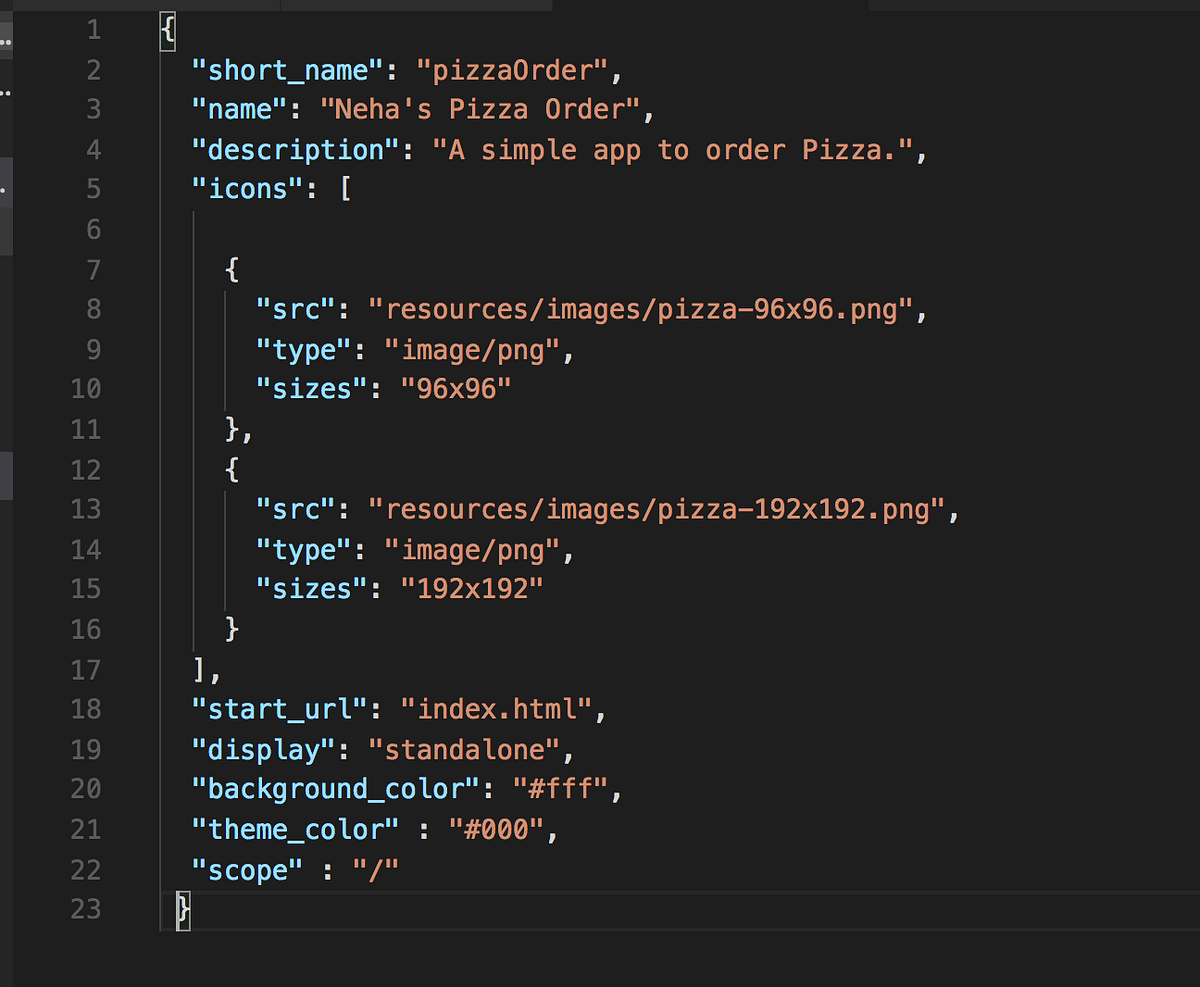
The manifest.json is a simple JSON file. It uses key-value pairs to store information. The file begins with an opening curly brace {and ends with a closing brace }. Inside, properties are listed with commas separating each item.
Example structure:
{ "name": "My App", "short_name": "App", "start_url": "/index.html", "display": "standalone", "icons": [] }Common Properties
- name:Full name of the app shown to users.
- short_name:Short version used on home screens.
- start_url:URL loaded when the app starts.
- display:Controls the app’s display mode, like fullscreen.
- icons:List of icons used for the app’s launcher.
- background_color:Sets the background color during load.
- theme_color:Defines the browser toolbar color.

Credit: hellonehha.medium.com
Role In Web Apps
The manifest.json file plays a crucial role in shaping how web apps behave and appear to users. It acts as a blueprint that tells browsers how your app should look and function outside the traditional webpage environment. Understanding its role can help you create web apps that feel more like native apps, improving engagement and usability.
Enhancing User Experience
The manifest.json lets you control key visual elements like the app’s icon, name, and theme color. These details influence how users see your app on their devices, whether it’s on the home screen or in the task switcher.
By customizing these elements, you make your app instantly recognizable and more inviting. Have you noticed how some apps blend seamlessly with your device’s interface? That polish often comes from a well-crafted manifest file.
Offline Capabilities
The manifest.json works alongside service workers to enable offline use. While the manifest defines the app’s identity, service workers handle caching and data management when the network is unavailable.
This combination allows users to continue interacting with your app even without internet access. Imagine checking your to-do list or reading saved articles without interruption—this is the practical power the manifest supports.
App Installability
One of the manifest’s key roles is to make your web app installable on devices. It provides the necessary details that browsers use to offer an “Add to Home Screen” prompt.
Installing your app means users can launch it directly from their device, just like a native app, without opening a browser first. Have you ever wondered why some websites offer this option and others don’t? The manifest.json is often the missing piece.
Creating A Manifest Json
Creating a manifest.json file is a key step in building a web app. This file tells browsers important details about your app. It controls how your app looks and behaves when installed on a device. A well-crafted manifest.json improves user experience and app performance.
Essential Fields
The manifest.json file requires some basic fields to work properly. These fields provide core information about your app.
- name: The full name of your app.
- short_name: A shorter name for display on smaller screens.
- start_url: The page that opens when users launch the app.
- display: Defines how your app appears (e.g., fullscreen, standalone).
- background_color: Sets the background color of the splash screen.
- theme_color: Controls the browser’s color theme for your app.
Icons And Display Settings
Icons are vital for app recognition on devices. Include multiple icon sizes for different screen types.
- Use PNG images with sizes like 48×48, 72×72, 96×96, 144×144, and 192×192 pixels.
- Specify each icon’s
src,sizes, andtypein the manifest. - The
displayproperty controls the app’s window style, such asfullscreenorminimal-ui.
Customization Tips
Customize your manifest.json to better fit your app’s needs and branding.
- Add a
descriptionto explain your app’s purpose. - Use the
orientationfield to lock screen orientation if needed. - Include
langto specify the app’s language. - Test your manifest on various devices to ensure it works correctly.

Credit: discourse.mozilla.org
Manifest Json And Pwas
The Manifest JSON file plays a key role in Progressive Web Apps (PWAs). It defines how the app appears to users and how it behaves when installed on a device. This simple JSON file contains metadata like app name, icons, theme colors, and display settings.
Using Manifest JSON makes a web app look and feel like a native app. It allows users to add the app to their home screen and launch it full screen without a browser address bar. This improves user engagement and trust.
Integration With Service Workers
Manifest JSON works closely with service workers. Service workers handle caching and background tasks. Together, they enable offline use and fast loading.
Service workers manage network requests, while Manifest JSON controls app appearance. This team effort creates a seamless user experience.
Boosting Performance
Manifest JSON helps improve app speed. It allows browsers to pre-load icons and resources. This reduces waiting time when launching the app.
Properly configured Manifest JSON ensures smooth transitions and quick startup. Users see less delay and more responsiveness.
Cross-platform Support
Manifest JSON provides consistency across devices. It supports different screen sizes and operating systems.
Whether on Android, iOS, or desktop, PWAs look similar. This uniformity builds user confidence and simplifies development.
Troubleshooting Manifest Json
Troubleshooting Manifest JSON can save time and avoid app errors. This file controls key settings for web apps. Errors in the manifest can cause apps to fail or behave oddly. Finding and fixing these issues is important for smooth app performance.
Common Errors
- Missing or incorrect
nameorshort_namefields - Invalid JSON format, such as missing commas or brackets
- Incorrect
start_urlthat leads to a wrong page - Unsupported icons or wrong icon sizes
- Wrong values in
displayororientationproperties - Using relative paths incorrectly in URLs
- Fields with empty or null values
Validation Tools
Use online validators to check the manifest file. These tools highlight errors and suggest fixes.
- Google Chrome DevTools Application panel shows manifest issues
- JSONLint validates JSON syntax
- Webhint provides detailed reports on web app manifests
- Manifest Validator by MDN checks common manifest mistakes
Best Practices
- Keep JSON syntax clean and error-free
- Use absolute URLs for icons and start URLs
- Define all required fields clearly
- Test the manifest on multiple browsers
- Update icons in recommended sizes (48×48, 72×72, 96×96, etc.)
- Check manifest after every change
- Use comments in code editors for notes, but remove before deployment
Credit: developers.docusign.com
Frequently Asked Questions
What Is A Manifest.json File?
A manifest. json file is a metadata file for web apps. It defines the app’s name, icons, and theme colors. It helps browsers install and display the app properly on devices. This file improves user experience by enabling Progressive Web App features.
Why Is Manifest.json Important For Web Apps?
Manifest. json allows web apps to behave like native apps. It controls how the app appears on home screens and in task switchers. This file enhances app discoverability and usability. It is essential for Progressive Web App functionality.
How Do Browsers Use Manifest.json?
Browsers read manifest. json to customize app presentation. They use it to display icons, app name, and theme colors. It enables installation prompts for Progressive Web Apps. Browsers rely on it to offer a native-like user experience.
Can Manifest.json Improve Seo?
Manifest. json indirectly supports SEO by enhancing user engagement. It enables Progressive Web App features, improving site speed and usability. Better user experience can lead to lower bounce rates. This can positively impact search engine rankings.
Conclusion
Manifest JSON helps define how web apps appear and behave. It tells browsers about app icons, colors, and start modes. This file improves user experience on different devices. It also makes web apps feel like native apps. Understanding Manifest JSON is useful for web developers.
It is a small but important part of web design. Using it correctly can improve your website’s appeal. Simple steps can make your app more user-friendly. Every web project benefits from a clear Manifest JSON file.

Similar Posts