Can I Delete Manifest Json React: Essential Guide
Are you wondering if you can delete the manifest.json file in your React project? It’s a common question for developers trying to keep their code clean and efficient.
But before you hit delete, it’s important to understand what this file does and how removing it might affect your app. You’ll discover why the manifest. json matters, when it’s safe to remove, and what to watch out for. Keep reading to make sure your React app stays smooth and error-free.
Credit: github.com
Role Of Manifest.json In React
The manifest.jsonfile plays a key role in React projects. It helps the browser understand how to treat your web app. This file contains important settings that improve user experience and app performance.
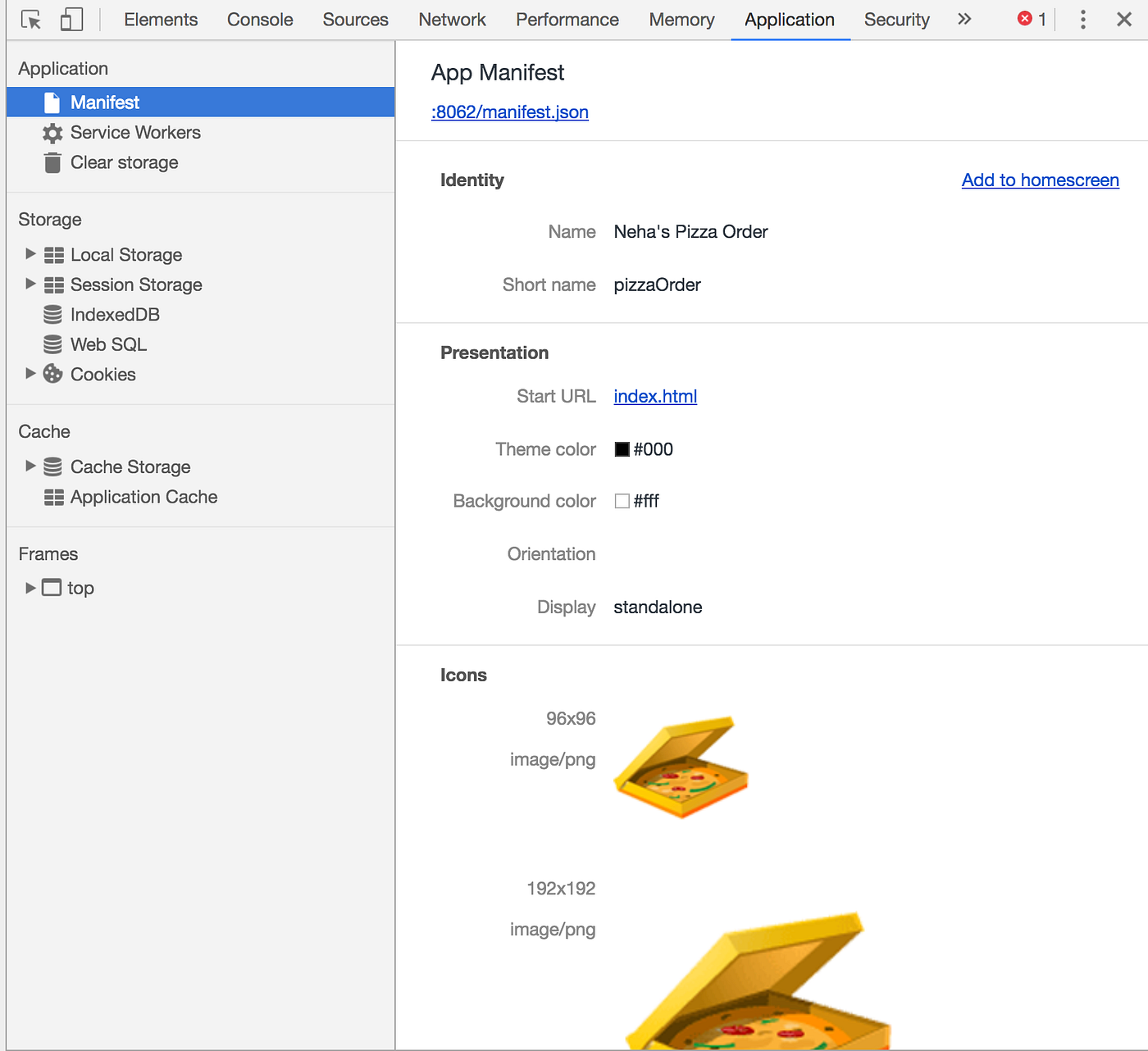
Browsers use manifest.jsonto display your app correctly on devices. It controls how the app looks when saved to a home screen. This file also defines icons, colors, and app behavior.
Purpose In React Projects
The main purpose of manifest.jsonis to make your React app act like a native app.
- Enables “Add to Home Screen” functionality on mobile devices.
- Defines app name and short name for easy identification.
- Specifies theme and background colors for consistent appearance.
- Improves user engagement by enabling offline support.
- Helps browsers understand app scope and start URL.
Key Components Inside Manifest.json
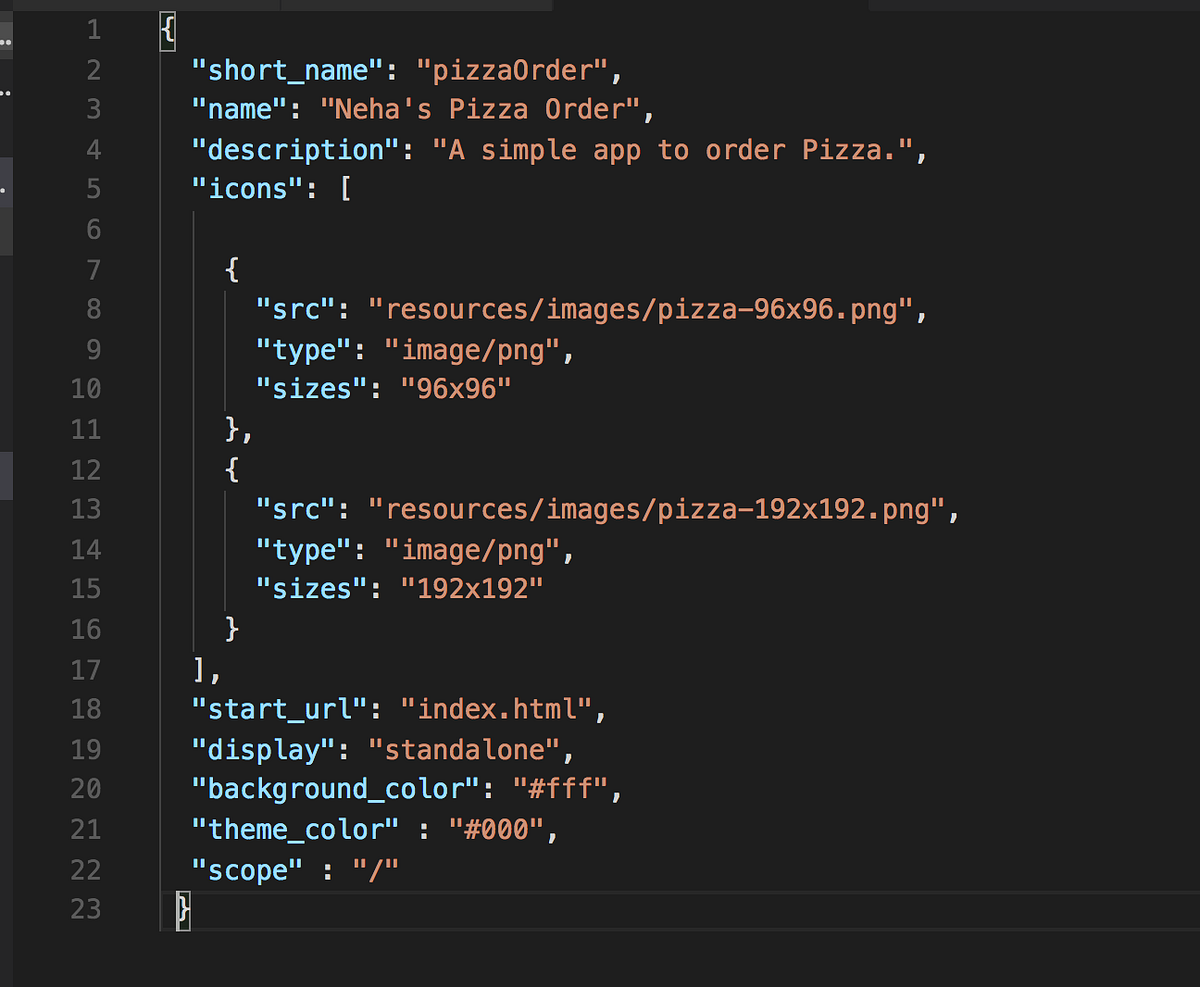
The file includes several important properties to control app behavior:
| Component | Description |
|---|---|
name | Full name of the app shown to users. |
short_name | Shorter version for smaller spaces like home screen icons. |
icons | Array of icon images in different sizes for devices. |
start_url | URL loaded when the app starts from the home screen. |
background_color | Color shown during app loading. |
theme_color | Color used in device UI elements like the status bar. |
display | Controls app display mode (fullscreen, standalone, minimal-ui). |
scope | Defines which URLs belong to the app. |
Credit: hellonehha.medium.com
Impact Of Deleting Manifest.json
Deleting the manifest.jsonfile in a React project can change how your app looks and works. This file holds key details about app icons, theme colors, and how the app behaves on devices. Removing it impacts user experience and the app’s integration with devices.
Effect On App Icons And Appearance
The manifest.jsoncontrols app icons shown on home screens and browser tabs. Without it, default icons or generic placeholders appear. This makes your app less recognizable to users. Theme colors and screen orientation settings also stop working. The overall look becomes plain and less polished.
Consequences For Progressive Web Apps
Progressive Web Apps (PWAs) rely on the manifest.jsonfor installation and offline features. Deleting this file disables the install prompt on devices. Users cannot add the app to their home screens easily. Offline caching and background sync features may fail. This reduces the app’s functionality and user engagement.
When Deletion Is Safe
Knowing when it’s safe to delete the manifest.jsonfile in a React project can save you from unexpected issues. This file mainly supports Progressive Web App (PWA) features, so if your project doesn’t rely on those, removal might be harmless. However, it’s important to understand your project’s needs before deleting it.
Projects Without Pwa Features
If your React app doesn’t use PWA capabilities like offline support, home screen installation, or push notifications, the manifest.jsonoften plays little to no role.
Many simple websites or internal tools don’t require these features. In these cases, deleting the manifest file won’t affect your app’s performance or functionality.
Check your index.htmlor service worker setup to confirm if the manifest is referenced. If you don’t find any dependency, you can safely remove it without breaking your app.
Alternatives To Manifest.json
If you want to keep some app customization but don’t want a full manifest, consider alternatives that serve specific needs.
- Meta tags:Use meta tags in your HTML to control app appearance and behavior on mobile devices.
- Service workers:Manage offline capabilities and caching directly through service worker scripts without relying on a manifest.
- Custom icons and splash screens:Embed these directly in your HTML or through CSS instead of referencing them in a manifest file.
Think about what features you really need. Could these alternatives replace the manifest.json in your project? This helps you keep your codebase clean while maintaining important functionality.
How To Remove Manifest.json Correctly
Removing the manifest.jsonfile from a React project requires care. This file controls how your app behaves as a Progressive Web App (PWA). Deleting it without proper updates can cause errors or broken features.
Follow the right steps to ensure your project stays clean and functional after removal.
Steps To Delete Safely
- Locate the
manifest.jsonfile in thepublicfolder. - Delete the
manifest.jsonfile from your project directory. - Check your
index.htmlfile for any references tomanifest.json. - Remove the
tag fromindex.html. - Clear your build cache by running
npm run cleanor deleting thebuildfolder. - Rebuild your project to confirm no errors occur.
Updating Related Files And References
- Inspect your service worker setup for any links to
manifest.json. - Modify or remove code sections that rely on the manifest file.
- Review the
publicfolder for icons or files referenced only by the manifest. - Delete unused icon files to keep the project tidy.
- Test your app on different browsers to ensure smooth operation.
- Update your documentation to reflect the removal of the manifest file.
Troubleshooting After Deletion
Deleting the manifest.jsonfile in a React project might seem straightforward, but it can lead to unexpected hiccups. This file plays a crucial role in defining how your app behaves when installed on devices or added to home screens. If you’ve removed it, you may notice issues that disrupt user experience or app functionality.
Common Issues And Fixes
After deleting manifest.json, you might see your app missing its icon when saved to a device’s home screen. The splash screen could also be absent, or the app may not prompt for installation at all.
Here’s what you can do to fix these problems:
- Missing app icon:Without the manifest, browsers don’t know which icons to use. You can add a simple manifest with just icon paths to restore this quickly.
- No install prompt:The manifest file signals the app’s installability. If it’s gone, the browser won’t trigger the prompt. Re-adding the manifest or adjusting your service worker can help.
- Broken splash screens:These depend on manifest settings like background color and display mode. Fix this by ensuring these fields are correctly set in a new manifest.
Have you checked your browser’s developer console? It often shows warnings or errors about missing manifest files. This can guide you toward what exactly needs fixing.
Restoring Manifest.json If Needed
If deleting the manifest caused too many issues, restoring it is a smart move. You can find the original manifest.jsonin the React app’s publicfolder or from your version control history.
Copy the file back and make sure it includes key properties like:
| Property | Description |
|---|---|
name | The full app name shown to users |
short_name | A shorter name for display on smaller screens |
icons | Array of icon files with sizes and types |
start_url | The URL that opens when launching the app |
display | Controls app display mode (e.g., standalone) |
background_color | Background color of the splash screen |
Once restored, clear your browser cache or use an incognito window to test. This ensures you’re loading the latest manifest changes.
Have you ever faced a moment where a small missing file caused a big headache? React projects rely on these seemingly minor files more than you might expect.

Credit: hellonehha.medium.com
Best Practices For Managing Manifest.json
Managing your manifest.jsonfile effectively is key to ensuring your React app runs smoothly and looks professional across different devices. This small file controls how your app behaves when installed on a user’s device, so it deserves careful attention. Handling it well can improve user experience and boost your app’s credibility.
Maintaining App Consistency
Your manifest.jsonsets the tone for your app’s appearance outside the browser. Keeping icons, colors, and names consistent with your brand helps users recognize your app instantly. If you change your app’s theme or logo, updating manifest.jsonensures the installed app reflects those updates.
Think about your users who add your app to their home screen. Will they see the right icon and name? If not, it might confuse them or make your app look unprofessional. Regularly check that the file matches your current design and branding.
Optimizing Manifest.json Usage
Not every property in manifest.jsonneeds to be filled out. Focus on the essentials that affect user interaction, like name, short_name, icons, start_url, and display. Removing unnecessary entries keeps the file clean and easier to manage.
Have you ever deleted the manifest.jsonand noticed your app’s install prompt disappeared? That’s because browsers rely on this file to know how to treat your app as a standalone experience. Instead of deleting, customize it to fit your app’s goals.
Keep the file size small by optimizing icon images and avoiding redundant metadata. This helps your app load faster and respond better on different devices. Always test changes on multiple platforms to catch issues early.
Frequently Asked Questions
What Is The Purpose Of Manifest.json In React?
Manifest. json configures a web app’s appearance and behavior on devices. It defines icons, theme colors, and display modes for React apps. This file improves user experience by enabling features like home screen installation and splash screens on mobile devices.
Can I Safely Delete Manifest.json In React?
Deleting manifest. json is possible but not recommended. Removing it disables important web app features like installability and theming. It might negatively impact user experience, especially on mobile devices where the app looks incomplete or lacks proper icons.
How Does Manifest.json Affect React App Performance?
Manifest. json does not affect core app performance or loading speed. It mainly enhances user experience by enabling progressive web app features. The file is small and only loaded once, so it has negligible impact on performance.
What Happens If Manifest.json Is Missing In React?
Without manifest. json, the app won’t support progressive web app features. Users can’t install the app on their home screens easily. Icons and theme colors won’t display properly, leading to a less polished and professional appearance.
Conclusion
Deleting the manifest. json file in React can cause issues. This file helps your app work well on different devices. It controls icons, colors, and how the app looks when saved to a home screen. Removing it might break these features.
Keep the file if you want a better user experience. Always check your app after any change. This way, you avoid unexpected problems and keep your app running smoothly.

Similar Posts