What Does Manifest Json Do: Simplifying Web App Setup
Have you ever wondered what makes your favorite web apps work smoothly on your device? The secret often lies in a small but powerful file called the manifest.json.
This file might seem simple, but it holds the key to transforming a basic website into a full-fledged app experience. If you want to understand how your apps load icons, set colors, and even decide how they open, knowing what the manifest.
json does is essential. Keep reading, and you’ll discover how this tiny file can change the way you interact with the web.
Role Of Manifest Json
The role of the Manifest JSON file in web development might seem small, but it plays a crucial part in shaping how users interact with your web app. This file is like a blueprint that tells the browser how your app should behave when installed on a device. Without it, your app could look and feel inconsistent across different platforms.
Purpose In Web Apps
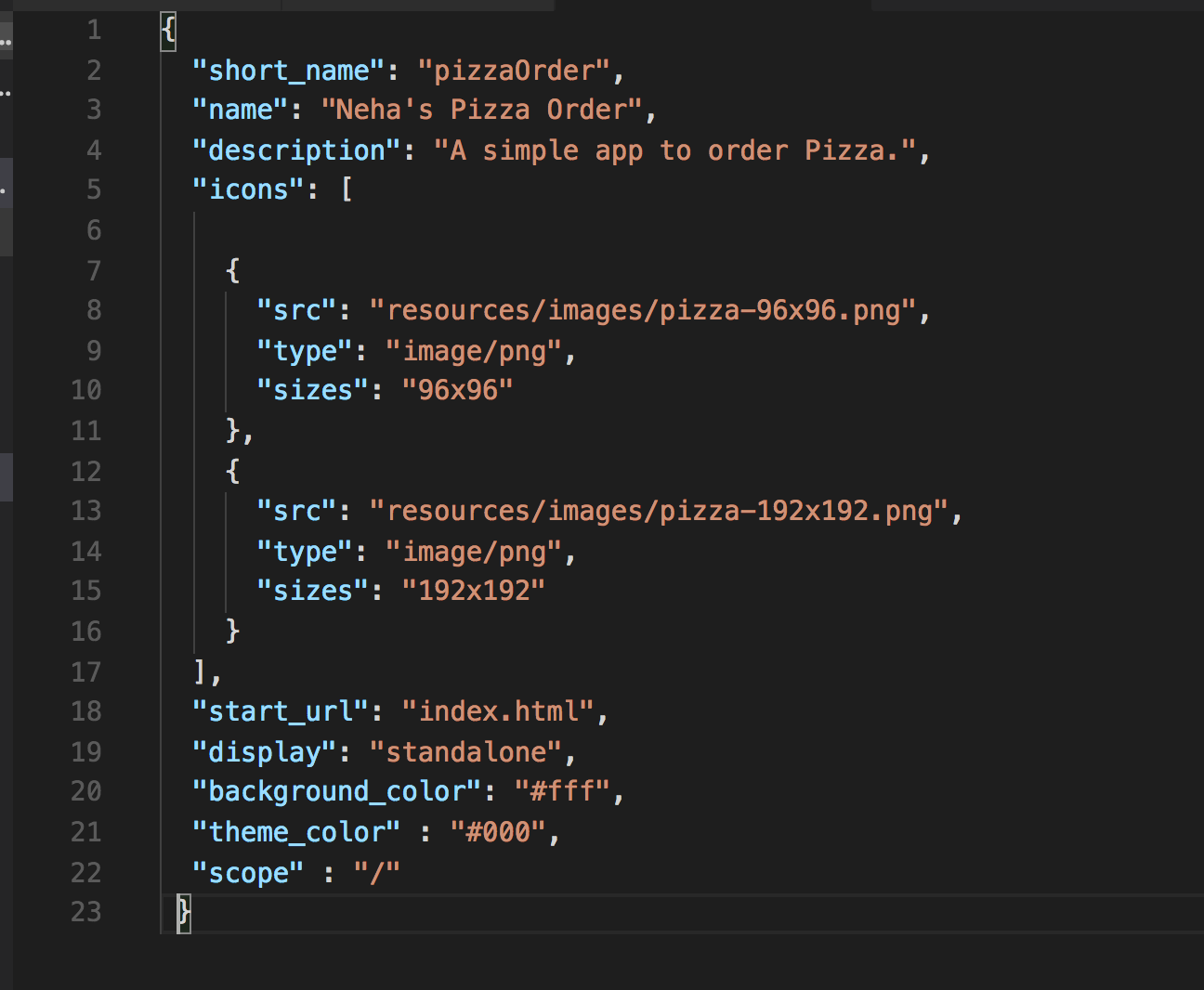
Manifest JSON defines essential details about your web app, such as its name, icons, and start URL. These details help the browser display your app correctly on a user’s home screen or app launcher.
It also controls how your app launches—whether it opens in a full-screen mode, as a standalone app, or within the browser tab. This enhances user experience by making your app feel more like a native app and less like a website.
Have you noticed how some web apps behave like regular apps on your phone, while others just open in a browser? That difference often comes down to whether the Manifest JSON is properly set up.
Key Features
- App Name and Short Name:Displays the app’s name under its icon on the device’s home screen.
- Icons:Defines various icon sizes so your app looks sharp on any device.
- Start URL:Specifies the page that loads when the app is launched.
- Display Mode:Controls the appearance (fullscreen, standalone, minimal UI, or browser).
- Theme and Background Colors:Customizes the app’s color scheme to match your branding.
- Orientation:Locks the app’s screen orientation to portrait or landscape if needed.
Each feature contributes to a smoother, more app-like experience. Ignoring these could mean your users miss out on easy access and a polished interface. What small detail could you add today that makes your app easier to use tomorrow?
Essential Components
The manifest.json file acts like a blueprint for your web app, defining how it should appear and behave when installed on a device. Understanding its essential components helps you create a seamless and engaging user experience. These components directly influence how users recognize and interact with your app outside the browser.
App Name And Icons
The app name is what users see on their home screen or app launcher. It should be clear and concise, reflecting your app’s purpose. You can specify different names like namefor the full title and short_namefor smaller displays.
Icons are equally important—they represent your app visually. You must include multiple icon sizes to ensure your app looks sharp on various devices. Providing icons in PNG format with different resolutions, such as 48×48, 96×96, and 192×192 pixels, covers most use cases.
Theme And Background Colors
The theme color defines the look of the browser’s address bar and the app’s title bar when launched. Choosing a color that matches your branding keeps the experience consistent. The background color appears during the app’s loading screen, preventing a white flash and improving perceived speed.
Picking the right colors can make your app feel more polished and professional. Have you ever noticed how a mismatched loading screen color disrupts your focus? Avoid that by setting these colors thoughtfully in your manifest.
Display Modes
Display modes control how your app appears on the device, affecting whether it feels like a website or a native app. Common options include:
- fullscreen:The app takes the entire screen, hiding browser UI.
- standalone:Looks like a native app with minimal browser elements.
- minimal-ui:Shows limited browser controls.
- browser:Opens in a regular browser tab.
Choosing the right display mode impacts user engagement. Would you rather have your app blend in with other native apps, or behave like a traditional website? Your choice here can shape that experience.
Improving User Experience
Improving user experience is key to keeping visitors engaged and satisfied with your website or web app. The manifest.json file plays a crucial role in shaping how users interact with your site beyond just the visual design. It adds layers of convenience and reliability that many users expect from modern web experiences.
Offline Support
Have you ever lost connection and wished a website still worked smoothly? The manifest.json works with service workers to enable offline support. This means parts of your site can load even without internet access, giving users uninterrupted access to essential content.
This is especially useful for users in areas with spotty internet or when traveling. By defining resources that should be cached, the manifest helps create a seamless experience that feels more like a native app. Would you prefer a site that breaks when offline or one that still functions reliably?
Home Screen Installation
Allowing users to add your website to their device home screen makes access quick and easy. The manifest.json file controls how your site appears on the home screen, including the icon, name, and launch behavior. This simple step can turn casual visitors into frequent users.
Imagine opening your favorite site with a single tap, just like an app you downloaded. This convenience can boost return visits and engagement without needing users to visit an app store. Have you noticed how adding a site to your home screen changes how often you use it?
Consistent Branding
Maintaining consistent branding across devices builds trust and recognition. The manifest.json lets you specify icons, theme colors, and splash screens that match your brand identity perfectly. This ensures users see your brand exactly as you want it, whether on desktop or mobile.
Consistency in visuals strengthens user confidence and makes your site memorable. It’s a small detail that shapes how professional and polished your site feels. How often do you judge a site’s credibility based on its look and feel?
Integration With Service Workers
The manifest.json file works closely with service workers to improve web app experiences. Service workers act as middlemen between the web app and the network. They help control how resources load and manage caching. Together with manifest.json, they provide a smoother, faster, and more reliable user experience.
Enhancing Performance
Service workers use the manifest.json to know which files to cache. They store important files like icons and scripts locally. This reduces the need to fetch data from the server every time. As a result, web apps load quicker and run more smoothly. Users see less waiting and fewer interruptions.
Enabling Offline Capabilities
Manifest.json lists key app resources for service workers to cache. This allows users to access the app even without internet. Offline use is possible because service workers serve cached files. The app stays functional and responsive, no matter the connection. This boosts user satisfaction and trust.
Common Use Cases
The manifest.json file plays a crucial role in enhancing the user experience on the web. It acts as a bridge between your website and the device, allowing your site to behave more like a native app. Understanding where and how to use this file can help you make your web projects more engaging and accessible.
Progressive Web Apps
Progressive Web Apps (PWAs) rely heavily on the manifest.json file. This file defines the app’s name, icons, theme colors, and how it should appear when installed on a user’s device. Without it, your PWA won’t have a polished, native-like presence on the home screen.
You can customize the splash screen appearance and control whether the app opens in full-screen mode or with a browser UI. This enhances the user’s interaction by making your web app feel like a standalone application. Have you noticed how some web apps open seamlessly, almost like mobile apps? That’s the manifest.json at work.
Mobile Web Applications
Mobile web applications benefit from manifest.json by improving discoverability and usability. It allows users to add your web app to their home screen with a custom icon and name, making it easier to access later. This reduces the friction of repeatedly typing your URL or searching for your site.
Additionally, the manifest.json file can specify orientation preferences, so your app displays correctly whether in portrait or landscape mode. It also helps set a consistent look and feel across different devices, giving users a unified experience. Think about your favorite mobile web app—its smooth, app-like behavior often comes down to a well-crafted manifest.json.
Credit: github.com
Best Practices For Setup
Setting up your manifest.json file correctly improves your web app’s appearance and user experience. Follow these best practices to ensure your app looks professional and works smoothly across devices. Focus on key areas like icons, display settings, and regular updates.
Optimizing Icons And Sizes
Include multiple icon sizes to support different devices. Use PNG format for clear images with transparency. Common sizes include 48×48, 72×72, 96×96, 144×144, and 192×192 pixels. Ensure icons are simple and recognizable at small sizes. Add a purpose field if you use maskable icons to help with adaptive displays.
Defining Display Preferences
Set the display property to control how your app opens. Options include fullscreen, standalone, minimal-ui, and browser. Choose standalone to make your app feel like a native app without browser UI. Define orientation to lock the app in portrait or landscape mode if needed. These settings improve user focus and app usability.
Maintaining Manifest Updates
Keep your manifest.json file updated with any changes to your app. Update icons, names, and colors as your branding evolves. Clear browser cache or use versioning to ensure users get the latest manifest. Regular updates prevent outdated data and improve user trust. Test your manifest on different devices after changes.
Troubleshooting Manifest Issues
Troubleshooting manifest issues can be tricky. The manifest.json file controls how your web app behaves on devices. Errors in this file may cause your app to not load correctly or miss key features. Understanding common problems helps fix these issues quickly. Let’s explore ways to troubleshoot manifest problems efficiently.
Validating Json Syntax
Manifest.json must follow strict JSON rules. Even a small mistake breaks the file. Use online JSON validators to check syntax errors. These tools highlight missing commas, brackets, or quotes. Correct syntax ensures browsers can read the manifest properly.
Always save the file in UTF-8 encoding. Avoid trailing commas and comments in the JSON file. These can cause parsing errors in some browsers.
Handling Browser Compatibility
Not all browsers support every manifest feature. Test your app in multiple browsers to spot compatibility issues. Some properties may work in Chrome but fail in Firefox or Safari.
Check browser documentation for supported manifest properties. Adjust your manifest to use widely supported features only. Use feature detection scripts to handle unsupported features gracefully.
Debugging Common Errors
Common manifest errors include incorrect file path, wrong MIME type, and missing fields. Use browser developer tools to inspect manifest loading and errors. The console often shows detailed error messages.
- Verify manifest.json is linked correctly in the HTML head.
- Ensure the server serves manifest.json with the application/json MIME type.
- Include required fields like name, short_name, and icons.
Fixing these errors helps your app load and behave as expected across devices.
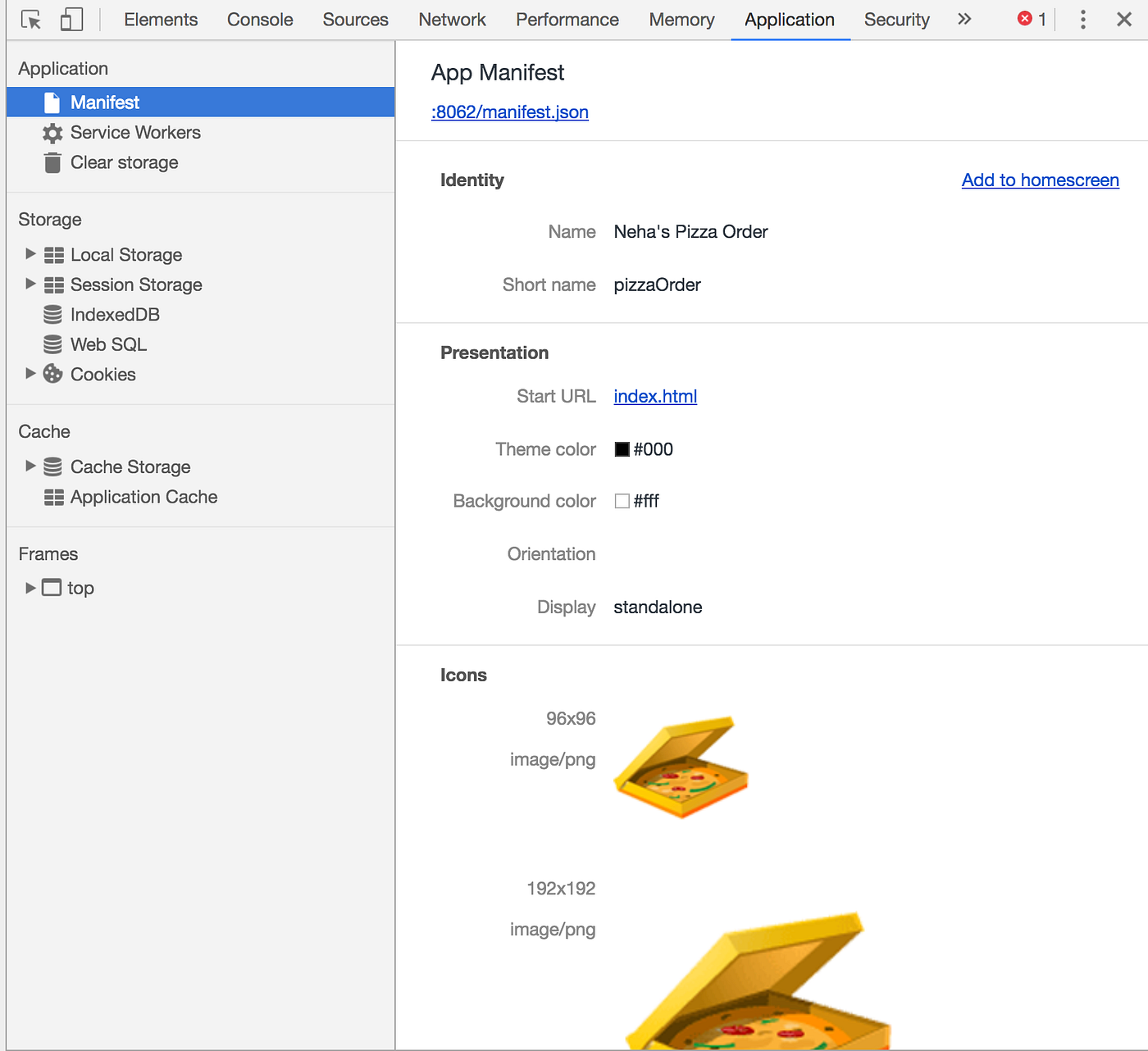
Credit: hellonehha.medium.com

Credit: hellonehha.medium.com
Frequently Asked Questions
What Is A Manifest.json File In Web Development?
A manifest. json file defines a web app’s metadata and settings. It controls the app’s name, icons, theme colors, and display mode. This file helps browsers understand how to launch and display the app, especially for progressive web apps (PWAs).
How Does Manifest.json Improve User Experience?
Manifest. json enables apps to launch in full-screen or standalone mode. It customizes app appearance on devices and controls the splash screen. This creates a native-like experience, making web apps feel more integrated and polished for users.
Can Manifest.json Affect Seo And App Discoverability?
While manifest. json itself does not directly impact SEO rankings, it improves user engagement. Better engagement and app usability can indirectly boost SEO by increasing time spent on site and lowering bounce rates.
What Essential Details Are Included In Manifest.json?
Manifest. json includes app name, short name, icons, start URL, theme color, background color, and display mode. These details guide how the app looks and behaves when installed or accessed on a device.
Conclusion
Manifest. json helps define a web app’s look and feel. It tells the browser how to display the app on devices. It also controls icons, colors, and startup settings. This file improves user experience and app usability. Understanding it makes web development easier and clearer.
Simple but powerful. A small file with a big role.

Similar Posts